Saree Photo Editing: How to Do It in Minutes with AI (2026)
You have a photo of a saree lying flat on a bed, and you need something that makes a customer stop scrolling. Sometimes a free phone app is enough to fix the light. Sometimes the saree needs to be a different colour, or on a person, and that is where ordinary editors run out. This guide sorts out which tool does which job and what each costs, then walks through turning the flat photo into a model shot in about a minute.
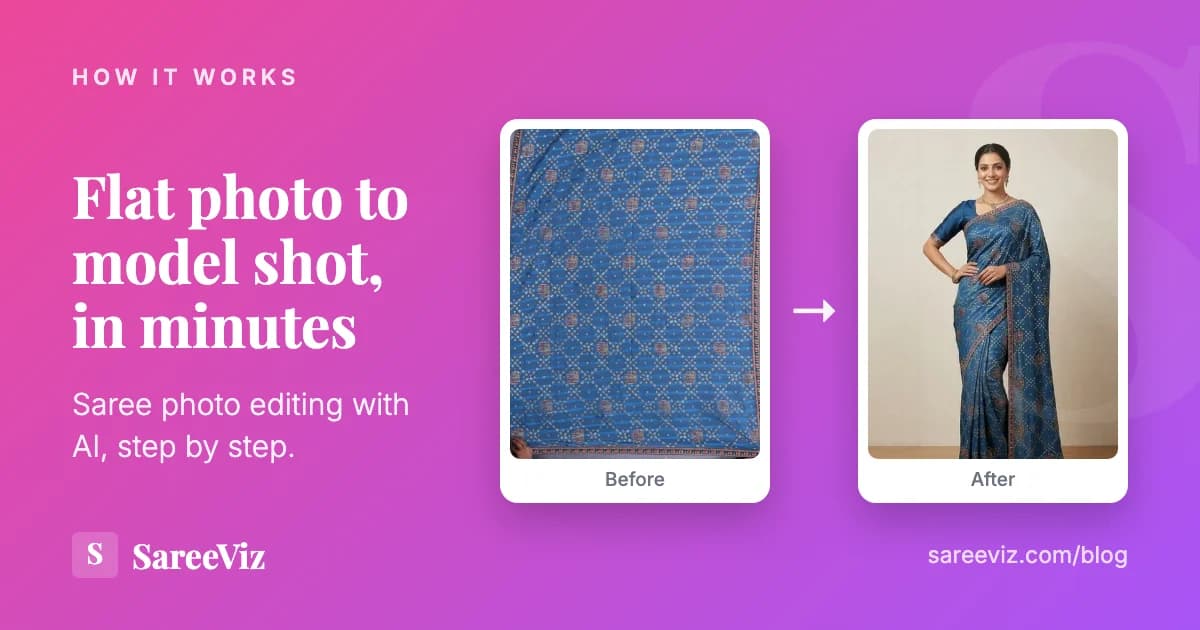
The job most sellers actually want done: a flat saree photo, turned into something that looks like a real shoot.
What this guide covers
- What people actually mean when they search for photo editing
- How to change a saree’s colour in a photo, and which apps do it
- Why normal photo apps cannot put a saree on a model
- What each option costs, with real numbers
- How to take the input photo so the result looks good
- The step by step, start to finish
Three jobs hiding behind one search
When a saree seller searches for photo editing, they usually want one of three things, and the difference matters because the tools barely overlap.
The first job is fixing a photo you already have. The colour looks dull, the light is yellow, there is a cupboard in the background. This is ordinary editing, and ordinary apps handle it well.
The second is changing the saree’s colour. The same design comes in blue, or the photo made a royal blue look navy, and you want the picture to match. Ordinary apps can nudge a shade; a full change needs an AI editor. The section below goes through the apps that do it and the one rule that keeps it honest.
The third is making a photo you do not have. You have the saree folded on a table, and you need it draped on a person, looking like a catalogue. No amount of brightness and contrast will put a saree on a model. This is the job most sellers are really trying to do, and it is the one that used to require booking a studio. It is also harder than it sounds, because a saree is really two garments: in our analysis of 207,556 catalogue images, 69% of saree jobs came with a blouse uploaded separately. Our saree photography page shows this job end to end, and if you are comparing tools for it, the tools comparison ranks the options.
There is a fourth meaning that fills a lot of search results, and it is not about selling at all. Portrait apps such as Dreamina take your selfie and a ready-made prompt and return you in a saree at golden hour. Fun for Instagram, but the saree in that picture is invented, so it is no use for a listing. The rest of this guide is mainly about the third job, because that is where the money and the hours go.
What sellers try first, and where it breaks
Almost everyone goes through the same three attempts before landing somewhere useful.
Phone apps built for selfies
Free and quick, and genuinely good at brightness, colour and cropping. But they are built for faces, not fabric. They cannot drape a saree, and their background removal often eats the pallu edge because it cannot tell sheer fabric from background.
Paying a local editor
Usually ₹50 to ₹150 per image, and the work is fine. The trouble is turnaround and scale. A hundred new designs means a hundred messages, a wait of two or three days, and a bill of ₹5,000 to ₹15,000. Then next season it starts again.
Booking a real photoshoot
The best quality, and the reason it is rare: a model, a photographer, a studio and a stylist for a day comes to roughly ₹40,000 for a small catalogue. For most boutiques that is a once a year expense, which means most of the catalogue never gets shot at all.
Changing a saree’s colour in a photo
“Best apps to edit saree color to blue” is a real search, typed often enough to show up in our own Search Console. The honest answer depends on how far the colour has to move.
A small shift: Lightroom’s Color Mix
If the photo turned a royal blue into navy, Lightroom is enough. Its Color Mix panel lets you pick a colour range and drag its hue, saturation and brightness. The catch, in Adobe’s own words, is that it changes that colour throughout your photo. A blue curtain behind the saree moves with it, so shoot against a plain background that shares no colour with the fabric.
A full change: AI recolour tools
To turn a red saree blue, you need a tool that knows where the saree ends. PixelBin has a saree editor where you describe the change in plain words, and it makes colour variants from one photo; three images a month are free. Photoroom lists a Recolor Clothing tool on its pricing page, pitched at colour variants in bulk, with a free trial rather than a free plan. Whichever you use, check the border afterwards: a contrast border should keep its own colour while the body changes.
One rule matters more than the app. A buyer who orders the blue one and receives a green one has every reason to send it back, and a recoloured photo of a colour you do not stock is exactly how that happens. Use recolouring to make the photo match the real fabric, not to invent a shade.
If the design really does come in several colours, show the real ones. SareeViz does not recolour; it copies the colour from your photo. In Colour Matching you upload one photo of the other colours of the same design, and each one appears on a rack beside the model or on its own model, side by side.
Checked on 7 October 2026 at Adobe’s Lightroom colour tutorial, pixelbin.io and photoroom.com/pricing. Free limits change, so check before you rely on one.
What AI changes that a normal editor cannot
A normal editor works with the pixels already in your photo. It can make them brighter, warmer or a different hue, and it can cut some of them away. An AI tool built for clothes generates new pixels: a person, the folds of a drape, a room behind them. That is the whole difference, and it explains both what AI can do and why it needs a clean input photo to copy from.
| What you want | Phone editing app | AI built for clothes |
|---|---|---|
| Fix yellow light or a dull colour | Yes, and free | Not needed for this |
| Remove a messy background | Often, but sheer pallu edges get eaten | Replaces the whole scene |
| Show the saree draped on a model | No | Yes, from one flat photo |
| Keep the same model across a catalogue | No | Yes, by reusing a Model Image |
Draping is the hard part, and it is where tools differ most. Our comparison of saree draping software compares eight of them, including which handle regional styles like Nivi and Bengali and what each costs per image.
What a flat saree photo can become
Sarees arrive from the supplier or the godown flat: folded on a table, or held up against a wall. What a customer needs to see on the listing is the same saree on a person, draped properly, in light that shows the colour truthfully.
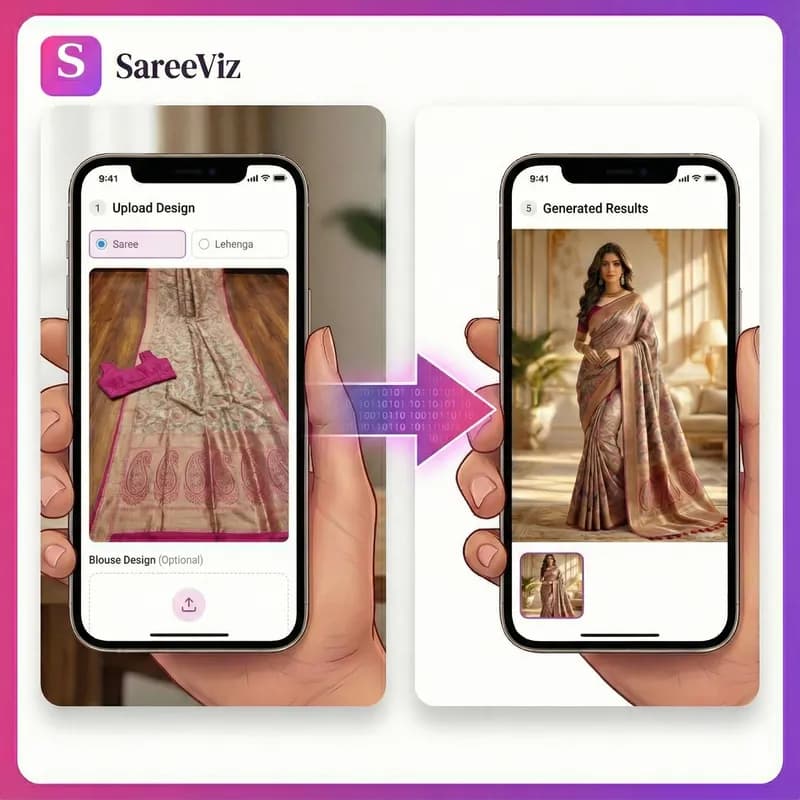
This is a real pair from our own catalogue test. The left photo is the input; the right one was generated from it.
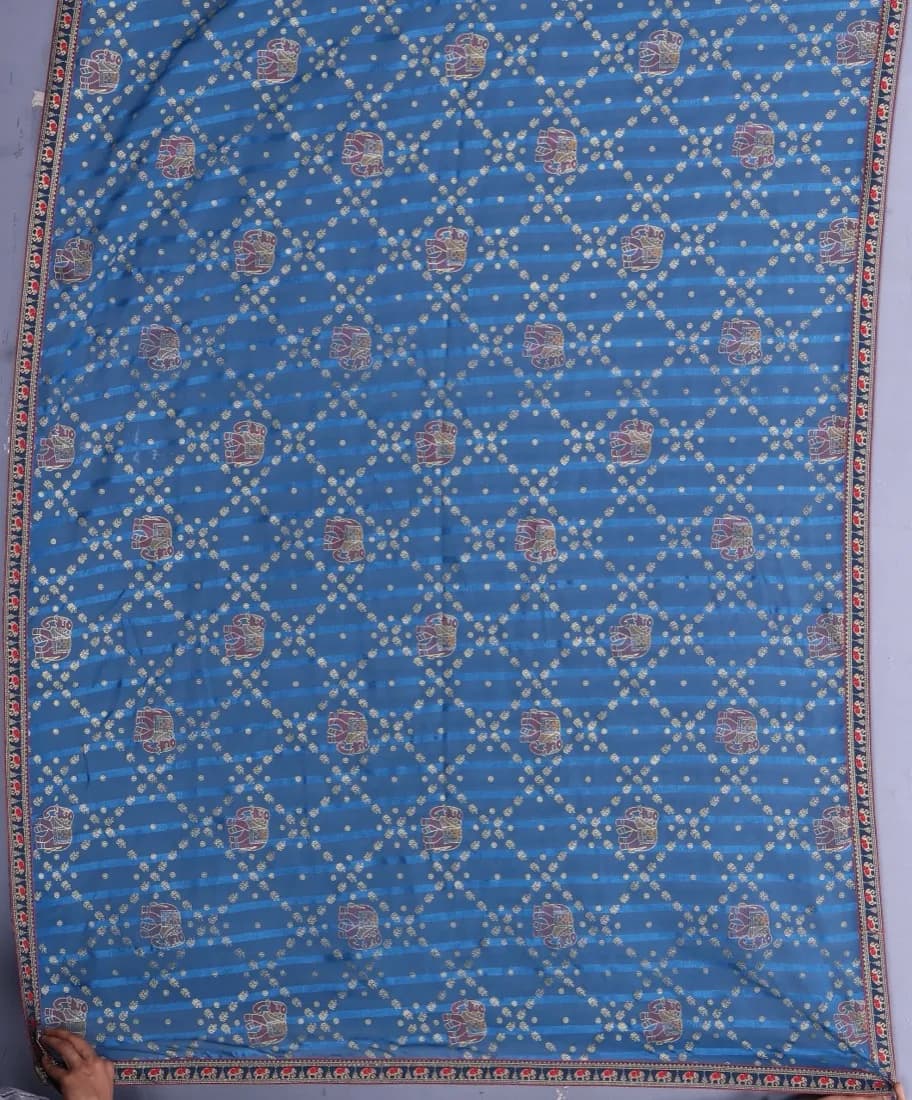
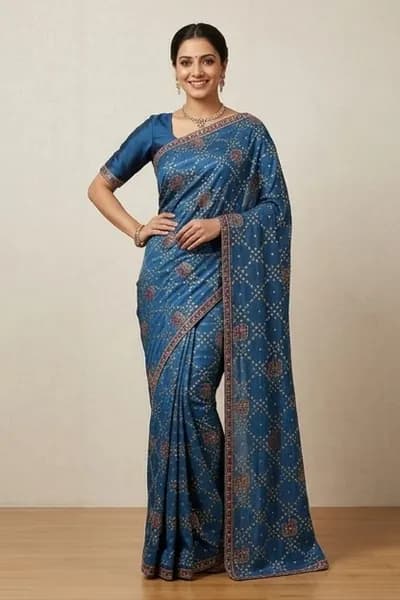
Look at the border and the gold lattice: they are the ones in the flat photo. The colour, the pattern and the trim survive, because the job is presentation, not redesign. The blouse is the one thing the tool added, matched to the border, since the flat photo had none. This same input produced all 36 images in our pose guide.
What each option costs
Numbers for a catalogue of 100 sarees, which is a normal season for a small boutique. The AI row below uses SareeViz per-image pricing, so you can check the rate for the resolution you actually need.
| Approach | Cost for 100 sarees | Time |
|---|---|---|
| Studio photoshoot | around ₹40,000 | 1 to 2 days, plus booking |
| Local editor | ₹5,000 to ₹15,000 | 2 to 3 days of back and forth |
| Doing it yourself in Photoshop | software cost, plus your time | weeks to learn, hours per image |
| AI, with SareeViz | ₹2,000 at ₹20 per 4K image, before 18% GST | an afternoon |
The gap that surprises most sellers is not the money, it is the time. A studio day has to be planned weeks ahead. New stock that arrives on Tuesday can be listed on Tuesday. The AI row assumes every image is a keeper, which it will not be; what a catalogue photoshoot costs per design builds the retries into the sum.
Get the input photo right
The single biggest thing that decides how good the result looks is the photo you start with. This takes five minutes to get right and saves a lot of frustration. Our guide on how to prepare your design photo goes through it fabric by fabric.
Do this
- Shoot near a window in daylight
- Lay the saree flat and smooth out creases
- Use a plain floor, bed sheet or table
- Keep the whole saree inside the frame
- Shoot straight down, not at an angle
Avoid this
- Yellow tube light at night
- Folded saree with the border hidden
- Busy background with other clothes
- Your shadow falling across the fabric
- Blurry photo taken in a hurry
A plain daylight phone photo of a flat saree beats an expensive camera shot in a dim room. The AI needs to see the colour and the border clearly, and daylight is what shows them honestly.
Step by step
- 1
Photograph the saree flat
Daylight, plain background, whole saree in frame. Phone camera is fine.
- 2
Upload it
Straight from your phone. No account setup beyond signing in, and no software to install.
- 3
Choose the model and the pose
Pick a South Asian model and a pose that suits the saree. Our guide to choosing the model, background and pose explains what each setting changes, so you are not guessing.
- 4
Generate and check
Takes about a minute. Look at the border and the pallu first, since those are what customers zoom into.
- 5
Download and list
The image comes out sized for Meesho, Amazon, Myntra and your own website. Listing on Meesho? The Meesho product photography page shows the front, side and back set its preset makes, and Amazon product photography does the same for Amazon.
When you still need a real photoshoot
Being honest about this saves you a bad surprise later. A studio shoot is still the right answer in a few cases.
- Your hero pieces. The three or four designs your brand is known for deserve a real shoot for the homepage and the campaign.
- Anything with unusual texture or weight that needs to be seen moving, like a very heavy lehenga drape.
- Print work. Hoardings and large banners need higher resolution than digital listings.
For the other ninety odd designs in the catalogue, where the goal is a clean, consistent listing image that shows the saree honestly, AI does the job at a fraction of the cost.
Frequently asked questions
Is sadi photo editing the same as saree photo editing?
Yes. It is the same word, spelled the way many people say it, and sellers search both ways. The job does not change with the spelling: making a photo of the saree good enough to sell from. Everything on this page applies either way.
What is the best app to change a saree's colour to blue?
For a small shift in shade, Lightroom's Color Mix panel moves one colour range, but Adobe notes it changes that colour throughout the photo, so a blue wall behind the saree moves too. For a full change, PixelBin has a saree editor that takes the change in plain words and makes colour variants, with three free images a month, and Photoroom lists a Recolor Clothing tool on its pricing page. Only list a colour you actually stock: a buyer who orders blue and receives green has every reason to send it back.
What is AI saree photo editing?
It is editing that adds things the camera never captured. A normal editor works with the pixels already in your photo, so it can brighten a saree but not drape it. An AI tool built for clothes reads the colour, border and pallu from your flat photo and generates a model wearing that saree, in a pose and setting you choose. On SareeViz that takes about a minute per image.
Can I edit a saree photo without Photoshop?
Yes. Photoshop was the old way, and it takes hours to learn and hours per photo. AI tools now do the same job from your phone. You upload the saree photo, pick a model, and get a finished image back in about a minute.
What is the best app for saree photo editing?
It depends on what you need. Ordinary photo apps like Snapseed or Lightroom are fine for fixing brightness and colour on a photo you already have. If you need the saree to appear on a model without a photoshoot, you need an AI tool built for clothes, such as SareeViz. Regular editing apps cannot put a saree on a person.
How much does saree photo editing cost in India?
A local editor usually charges ₹50 to ₹150 per image for basic clean-up. A full saree photoshoot with a model, photographer and studio runs to about ₹40,000 for a small catalogue. On SareeViz an image is 1 credit at 1K and 2 credits at 4K, bought as credit packs with no subscription, and the pricing page has the rupee price of each pack. You do it yourself, in minutes.
Will the edited photo be accepted on Meesho and Amazon?
Yes, if the image is clear, well lit and shows the product properly. Both platforms mainly care about resolution, a clean background and the product being clearly visible. SareeViz output is sized for Indian marketplaces, but it is always worth checking the current rules on the platform before you upload a whole catalogue.
Do I need a good camera to start?
No. A normal phone camera is enough. What matters more is light and a plain background. Shoot near a window in daylight, lay the saree flat without creases, and keep the whole saree in the frame. That beats an expensive camera in a dark room every time.
In short
Editing a saree photo covers several different jobs, and knowing which one you need saves a lot of wasted effort. If you only want to brighten a photo you already have, any decent phone app will do it for free. If the saree needs a different colour, an AI recolour tool can do it, as long as the new shade is one you actually stock.
If what you actually need is the saree on a model, that is a different job, and until recently it meant a studio and ₹40,000. It now takes a phone photo and about a minute, at ₹10 to ₹25 an image by resolution. For a boutique adding new designs every week, that is the difference between listing them and leaving them in a box.
Try it on one saree
See your saree on a model in a minute
Upload a flat photo, pick a model, download the image. From ₹10 per image, no subscription.
Try SareeViz Free →