AI Photoshoot for Clothing Brands: The Indian Ethnic Wear Guide
An AI photoshoot turns one flat photo of your garment into a catalogue image of a model wearing it, for a fraction of what a studio charges, even when you budget three attempts for every image you keep. On SareeViz that costs ₹10 an image at 1K and ₹20 at 4K before 18% GST, and the first image is ready in about a minute. This guide is about the part the global tools skip: sarees, lehengas, salwar suits, kurtis and blouses, which arrive as several pieces and have to be assembled correctly before any of the rest matters.
The whole loop: flat garment photo, model and pose, catalogue image.
What this covers
- What one image costs, in rupees, with the competitor prices we could verify
- What a saree, lehenga, salwar suit, kurti and blouse each need, and what goes wrong
- What 207,556 catalogue images from 2,741 Indian sellers show about how this is actually done
- The step by step run, exactly as the app works today
- How to keep one brand look, with the same model, across a whole catalogue
- Meesho’s published image rules, and why you should switch your logo off before uploading
What an AI photoshoot for a clothing brand actually is
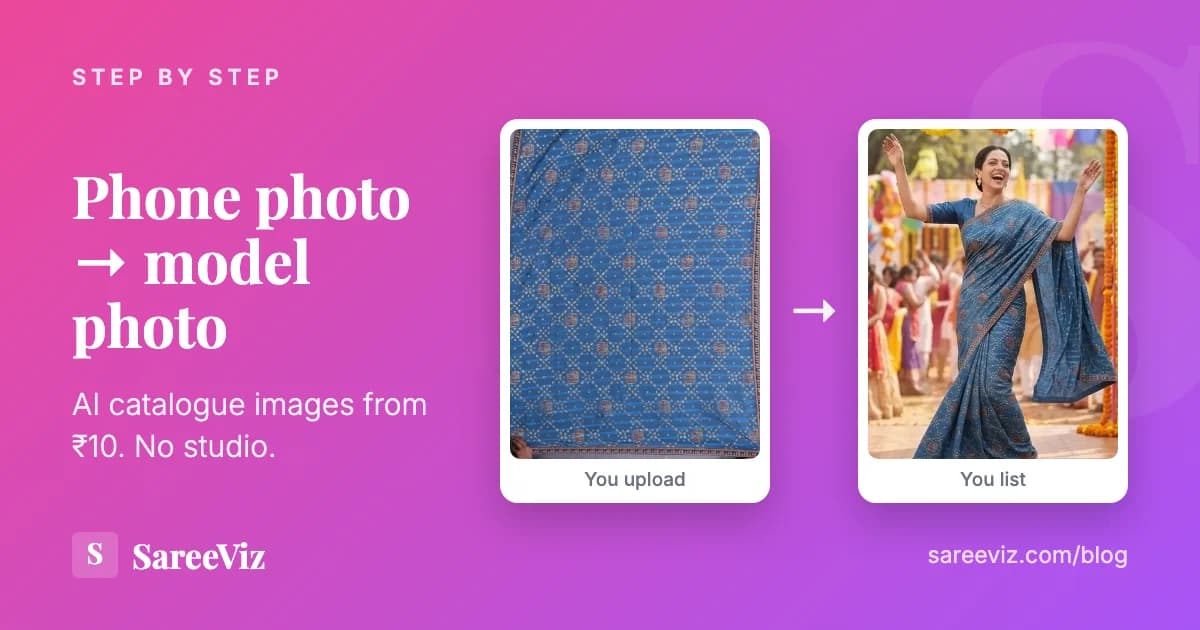
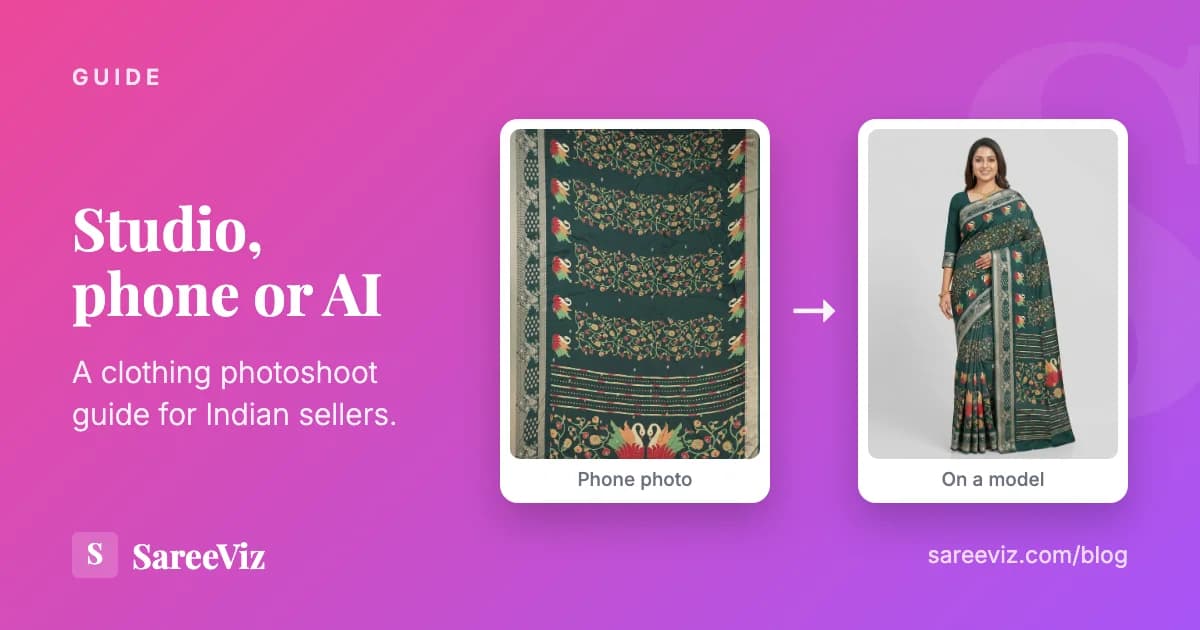
You photograph the garment flat, in daylight, on your phone. You upload that photo, pick a model and a pose or let the tool choose, and you get back an image of a model wearing your exact fabric, border and pallu. No studio booking, no model call sheet, no retouching queue. The garment in the output is yours; the person and the place are generated.
Three things follow from that, and they set the whole rest of this page. The output can only be as good as the input photo, because the AI cannot invent detail that is not there. The garment has to be described to the tool in pieces, because ethnic wear is sold in pieces. And the image still has to satisfy whichever marketplace you list on, which is a separate question from whether it looks good.
The technology has matured significantly. In 2026, AI photoshoot output is consistently used across Indian marketplaces (Meesho, Amazon India, Myntra, Flipkart) and accepted by all major platforms as compliant product imagery.
Time to first image
Traditional
5 to 14 days
AI
1 minute
Cost per image
Traditional
₹75 to ₹1,500
AI
₹10 to ₹25
Images per day
Traditional
20 to 40
AI
Unlimited
Selling a specific category? AI saree photography covers the drape, the fabric and the separate blouse upload, our clothing photoshoot guide sets AI against what Indian studios charge, AI jewellery photography handles the harder case of metal and stones, and AI innerwear and lingerie photography covers the category where booking a model is hardest of all. Still choosing a tool? Our comparison of AI fashion model generators ranks seven of them, and the ecommerce photography page shows the output formats we produce.
What it costs per image
SareeViz sells credits, not seats. One credit is ₹10 pre-tax in the smallest pack of ₹100, and packs from ₹5,000 up include bonus credits on top. An image costs 1 credit at 1K and 2 credits at 4K, so the per image price is ₹10 and ₹20 respectively, plus 18% GST at checkout. There is no subscription, and unused credits do not expire monthly. Every pack is on the pricing page.
| Resolution | Per image, pre-tax | What it is for |
|---|---|---|
| 1K | ₹10 | Marketplace listings and WhatsApp. This is what the Optimise for Ecommerce Upload tick sets. |
| 2K | ₹15 | Your own website, where buyers zoom. |
| 4K | ₹20 | The resolution most sellers actually pick, for crop and zoom headroom. |
| 8K | ₹25 | Print: banners, shop boards, lookbooks. |
For comparison, and only where we could check the price on the company’s own pricing page on 29 September 2026:
- AI Vastra, an Indian competitor, publishes AI catalogue packs from ₹1,000 for 80 images to ₹10,000 for 1,000 images. That works out at ₹12.50 an image at the smallest pack and ₹10 at the largest, and the same packs are also listed as a number of videos, 8 on the smallest. Those are 2K images: its pricing page names no size, but a check inside the product on 15 September 2026 found 2K as the only output, with no 4K or 8K on offer.
- FASHN sells a monthly subscription instead: the Basic plan lists $19 a month for 200 monthly credits. Its pricing page says most tools start at 1 credit per output and cost more at higher resolutions, so the cheapest output on Basic is about 10 cents, and a high-resolution one more than that.
Prices checked on aivastra.com/pricing and fashn.ai/pricing on 29 September 2026. We have left out every tool whose per image price we could not read off its own public page, including the ones whose plans are quoted only on request. Check before you buy; these move.
The number that decides whether any of this is worth it is not the price per image. It is how many attempts it takes to get one you will actually list. In our own data that ratio is roughly one keeper in three, which is covered below, and what a catalogue photoshoot costs per design builds those three attempts into the sum for a 50-design catalogue.
The five garments, and what makes each one hard
This is where a tool built for a t-shirt comes apart. A t-shirt is one piece of fabric with a front and a back. A saree is a length of drape plus a blouse piece, often in a different fabric, and the design has to land on the correct section of the drape. Nothing about that is a harder version of the t-shirt problem. It is a different problem.
Saree
What is hard: It is two garments sold as one. Six metres of drape fabric plus a blouse piece, and the design has to land on the right section: pallu, pleats, border.
What to upload: One tightly cropped photo of the full saree. Add the blouse, pallu or border in its own slot only if that part has its own design.
Watch for: A blouse photo with saree border in the corner puts the border design on the blouse. Crop to one part per photo.
Lehenga
What is hard: Three pieces with three different fabrics: the skirt, the choli and the dupatta. One photo of all three forces the AI to guess which is which.
What to upload: The skirt in Lehenga Design, then the choli and the dupatta each in their own slot.
Watch for: Occasion wear is where the flare matters, so pick a movement pose rather than a flat standing one.
Salwar suit
What is hard: Kameez, salwar and dupatta, plus sleeve and back work that a front photo never shows.
What to upload: Top or kameez is the required slot. Bottom, dupatta, sleeve and back designs are separate and optional.
Watch for: A photo of the whole set laid out together in the Top slot mixes all three fabrics.
Kurti and kurta
What is hard: The simplest ethnic garment to photograph, and the one buyers judge most on how it hangs when worn.
What to upload: One photo in the design slot. Bottom and Back designs open if the piece needs them.
Watch for: Kurti sellers ask for multiple poses far more than saree sellers do, because variety earns its keep at this price point.
Blouse
What is hard: Not a garment on its own in the app, but the piece that most often ruins a saree image. It has its own fabric, its own neckline and its own back.
What to upload: A photo of just the blouse piece, in the Blouse Design slot, cropped so no saree fabric is visible.
Watch for: For neckline and blouse work, a close-up pose crops at the chest so the embroidery reads at full size.
Two rules cut across all five. One part per photo, cropped tight, because whatever is in a photo is treated as belonging to that part. And always upload your original product photo, never an earlier AI output, because feeding a generated image back in is where framing and fine detail drift. Both are set out in full in preparing your design photo.
What 2,741 Indian sellers actually do
Most advice about AI photoshoots is written from a product page. This is written from usage. Between 1 January and 13 August 2026, 2,741 Indian sellers produced 207,556 catalogue images on SareeViz, and we published the full breakdown in our ethnic wear catalogue data study. Five findings matter if you are about to run your first shoot.
69.2%
of saree jobs upload the blouse as a separate file. A saree is two garments, and any tool that accepts only one image cannot represent what you sell.
65.4%
write their own style instructions rather than accepting a default. These are not one-click users; they know what the listing has to look like.
1 in 3
generations end in a download. Sellers average 168 jobs against 55 downloads, and the technical error rate is separate and small at 4.6%. Budget three attempts per keeper.
90.8%
choose 4K over 1K or 2K, then crop down per destination, rather than generating separately for each marketplace.
The fifth is about variety, and it is the one most brands get backwards. Only 16.7% of saree jobs ask for more than one pose, but 35.1% of kurti jobs do. Lehengas are lower still at 5.3%, with 1.13 images per job. Read that as a rule about price point: an expensive occasion piece wants one authoritative image, a mid-price kurti is bought on how it looks worn, and paying for six poses of a saree is usually money that would have been better spent on the next design.
The run, exactly as the app works today
Prep the photo before you upload
Lay the garment flat or hang it straight, shoot square on in even daylight, and crop until only fabric is in the frame. No floor, no hangers, no hands. For sarees this matters twice over, because your photo is what the draping guide is built from, and anything around the fabric gets draped too. Full rules: preparing your design photo.
Pick the garment and fill only the slots you need
Choose Saree, Lehenga, Salwar Suit, Kurti or one of the others under More. The main design slot is required. Blouse, pallu, border, choli, dupatta, sleeve and back slots exist so a part with its own design can be described separately. Leave the rest empty. Seven photos of the same saree are seven overlapping instructions, not seven chances to get it right.
Check the draping preview (sarees)
Upload a saree and an accurate draping preview appears, built from your own photo, with AI Draping Assistance already ticked. It tells the AI which part of your design belongs on the pallu, the pleats and the border. If the design sits on the wrong side, tap Rotate. It is a guide for the AI, not a preview of your final photo, so expect the fold count and exact pleat positions to differ. How other tools handle the drape is compared in saree draping software.
Choose the model, background and pose, or do not
Skip all three and the AI picks a model and a clean studio background. Or pick a Model prompt, or upload a Model Image to hold one face across a whole catalogue: the model image controls the person only, never their clothes. Tick up to 10 poses in one run, each producing its own photo. All 36 are shown on the same outfit in the pose guide, and the controls are explained in model, background and pose.
Set size, shape and format
Aspect ratio sets the shape, resolution sets sharpness, and the Generate button shows the credit cost before you tap. If the images are going to a marketplace, the Optimise for Ecommerce Upload tick sets 1K, portrait 3:4 and JPEG in one go. More in the settings guide.
Generate, then fix one photo rather than the batch
Images are ready in about a minute. If one is wrong, tap Regenerate on that photo and say what to change in one plain sentence, one change at a time. If the design itself is wrong, the problem is in the inputs rather than the generation, so fix the photo and run fresh. See fixing a result.
Brand for social, stay plain for the marketplace
Brand Logo, centre watermark, brand name and design number are applied at generation time, so they are set once per batch. They are worth having on WhatsApp and Instagram images, where forwarding is the point. They are exactly what Meesho's rules prohibit on a catalogue image, so run marketplace batches with branding off.
That is the short version. The long version, with every setting, the input photo problems and their fixes, is in our full guide to generating AI model photos. The same recipe per saree type sits on the saree photoshoot guide.
One brand look across the whole catalogue
A photoshoot for one product only has to make that product look good. A photoshoot for a brand has a harder brief: the two hundredth image has to look as if it came from the same day as the first. A real shoot gets that for free, because the model, the room and the light are all booked together. With AI it is a setting you choose, and a catalogue where every listing has a different face and a different room looks like a reseller’s page rather than a label.
- The same face. Upload a Model Image, a photo of the person whose face, hair and look you want, and reuse that same photo on every run. It controls the person only; the garment still comes from your design photo.
- A room of your own. A Background Image of your shop, a set or a plain wall is recreated behind the model. Using one photo as both Model Image and Background Image is allowed, and it means this person, in this place.
- Instructions you reuse. 65.4% of sellers in our data write their own style instructions. Keep yours in a note and paste the same sentence each run, so the lighting and mood stop drifting between batches.
- Put the logo where it belongs. Brand Logo, brand name and design number are applied at generation time. They are what makes an image recognisably yours on WhatsApp and Instagram, and what a marketplace catalogue must not carry.
The controls are set out in model, background and pose. For a catalogue that also shows every colour of a design, colour options and group photos puts the other colours on a rack beside the same model.
A general photo tool against one built for ethnic wear
| What you need to do | A general on-model tool | SareeViz |
|---|---|---|
| Upload a saree and its blouse piece as one outfit | One garment image per job. The blouse is a second, unrelated product. | Separate slots for the saree, the blouse, the pallu and the border. |
| Put the pallu design on the pallu | No concept of saree sections. | A draping preview built from your photo, with a Rotate control. |
| Describe a three-piece lehenga or salwar suit | Usually one top and one bottom. | Skirt, choli and dupatta, or kameez, salwar, dupatta, sleeve and back. |
| Hold one model across a season of listings | Varies by tool. | Upload a Model Image and reuse it; it controls the person only. |
| Meet a marketplace catalogue rule | Generic ecommerce presets. | One tick sets 1K, portrait 3:4 and JPEG. |
| Pay per image in rupees, with a GST invoice | Mostly monthly subscriptions in dollars. | Credits from ₹100, 18% GST, no subscription. |
The middle column describes the general category rather than any one named product, because feature sets change monthly and we are not going to state a competitor capability we have not tested this week. Run your own five designs through any shortlist before you commit.
Marketplace image rules worth knowing
One warning before the rules. Quoting pixel sizes from a blog post is how sellers get catalogues rejected, because the numbers that bind you are the ones inside your own seller panel and they change. Below is only what the marketplace publishes on its own public pages.
Meesho
Meesho states these on its supplier site, and they are the ones a generated image can get wrong:
Upload in JPEG, without any logo or watermark
This is the one that catches AI users out. Switch off Brand Logo and centre watermark for marketplace batches.
Include a sharp, clear image of the front of the product
A front standing or three-quarter turn pose is the safe primary image.
More than one image is recommended
Meesho recommends it rather than requiring it, so add a back or close-up pose while the credits are cheap.
No partial product images and no props
A close-up crop is fine as a secondary image but not as the product view, and a styled scene with objects in it is a prop.
A catalogue holds 1 to 9 products of the same category
Plan your generation batches around the catalogue, not around the design.
Source: Meesho supplier guidance at supplier.meesho.com/sell-online/clothes and its single catalogue upload lesson, read on 14 September 2026. Meesho keeps its detailed size and file rules inside the Supplier Panel, so check there rather than trusting a pixel figure from anywhere else, including us.
Amazon India and Flipkart
We are not printing numbers for either. Amazon India’s image requirement pages sit behind a Seller Central sign in, and Flipkart’s public seller pages describe good practice without stating dimensions. Both numbers circulate widely on third-party blogs and we have no way to confirm which version is current, so the honest answer is to open your own seller panel. What is safe to say is that the same three things decide it everywhere: a clean background, the product clearly the subject, and nothing overlaid on the image.
Practically, generating at 4K and cropping per destination covers most of this, which is what 90.8% of sellers in our data already do. For what each marketplace publishes and the image set our presets make for it, see Meesho product photography and Amazon product photography.
When an AI photoshoot is the wrong answer
Three cases, stated plainly, because a page that claims a tool fits everything is not worth reading.
- You have one design and a big budget behind it. A single hero campaign image for a flagship bridal piece is worth a real shoot. The economics here only become structural once the catalogue is large.
- Your input photos do not exist yet. If nobody has photographed the stock flat and cleanly, that work still has to happen. The AI replaces the studio, not the act of photographing the garment.
- The detail is the product and it is very fine. Thin lines, tiny motifs and dense zari are where AI makes small mistakes. A close-up photo of that area in the Close-Up Design slot helps it hold, but on the finest work, check every image before it goes live.
Frequently asked questions
Which AI is best for fashion photography?
There is no single best one, because "fashion" is not one problem. For Western wear on a body, most on-model tools handle a t-shirt or a dress from one flat photo. For Indian ethnic wear the test is narrower: can the tool take a saree and a blouse piece as two separate uploads and assemble them as one outfit? In our own usage data, 69.2% of saree jobs include a blouse uploaded as its own file, so a tool that only accepts one garment image cannot represent what is actually being sold. Pick on the garment you sell most of, not on the demo reel.
Can AI add clothes to a photo?
Yes, and that is the whole workflow here, but the direction matters. SareeViz does not start with a photo of a person and dress them. It starts with your flat photo of the garment and generates a model wearing that exact fabric, border and pallu. You can supply a Model Image if you want the same face across a catalogue, and the model image controls the person only: their clothing and background are ignored, and the garment always comes from your design photo.
What is the best AI for clothing brands?
It depends on what the brand sells and where it lists. A brand selling t-shirts and dresses on its own Shopify store has a wide choice of general on-model tools. A brand selling sarees, lehengas and salwar suits on Meesho has a much narrower one, because those garments arrive as several pieces and have to be assembled correctly, and because marketplace catalogue rules are strict about logos and props. Shortlist two or three tools, run the same five designs through each, and judge the outputs against your real product.
How much does an AI photoshoot cost per image in India?
On SareeViz one image is 1 credit at 1K and 2 credits at 4K, bought as credit packs, with no subscription and no minimum; the pricing page has the rupee price of each pack. AI Vastra, an Indian competitor, publishes packs from ₹1,000 for 80 images to ₹10,000 for 1,000 images, which is ₹12.50 down to ₹10 a 2K image, as of 29 September 2026; a check inside its product on 15 September 2026 found 2K is the only size it produces, with no 4K or 8K. Global tools mostly sell monthly credit subscriptions instead: FASHN lists a Basic plan at $19 a month for 200 monthly credits, and its pricing page says most tools start at 1 credit per output, with higher resolutions costing more, as of 29 September 2026.
Is there a free way to try an AI photoshoot?
Yes. A new SareeViz account starts with 5 free credits, which is 5 images at 1K or 2 at 4K, with no subscription to cancel afterwards. Credits are only taken for images that generate successfully. Spend them on your hardest design rather than your easiest, because that is the one that tells you whether the tool fits your catalogue.
How do I keep the same model across all my brand photos?
Upload a Model Image, which is a photo of the person whose face and look you want, and use that same photo on every run. The model image controls the person only, so their own clothes and background are ignored and your garment always comes from your design photo. Add the same Background Image each time as well if you want the setting to match too.
Will Meesho accept an image from an AI photoshoot?
Meesho's published image rules for suppliers are about the image, not about how it was made: upload in JPEG without any logo or watermark, no partial product images and no props, include a sharp clear front image, and more than one image is recommended. An AI image that meets those rules is a normal catalogue image. The practical trap is branding: if you switch on a logo or a centre watermark in SareeViz, that image breaks Meesho's no-logo rule, so keep branding off for Meesho catalogue uploads and use it for WhatsApp and Instagram instead.
Do I need a professional camera for the input photo?
No. A phone photo in even daylight is enough, because the AI is copying colour, weave and border from your photo rather than resolving fine optics. What actually decides the output is framing and cleanliness: crop so only the fabric is in the frame, shoot square on rather than at an angle, skip filters and beautify mode, and never feed an earlier AI output back in as the design photo. Two minutes of cropping saves more generations than a better camera does.
If you take one thing away
Choose the tool on the garment you sell most of. For Indian ethnic wear that means one question: can it take the saree and the blouse piece as two uploads and put them together as one outfit? Everything else, the models, the backgrounds, the poses, the marketplace presets, is downstream of getting the product right. Budget three attempts per image you will list, generate at 4K, crop per destination, and switch your logo off before the images go to Meesho.
Ready to start?
Run your first AI photoshoot today
Upload a flat garment photo, pick a model, download the catalogue image. From ₹10 an image, no subscription.
Try SareeViz free