AI Ecommerce Product Photography for Meesho, Amazon and Myntra
High-quality, conversion-focused photos for your online store in minutes.
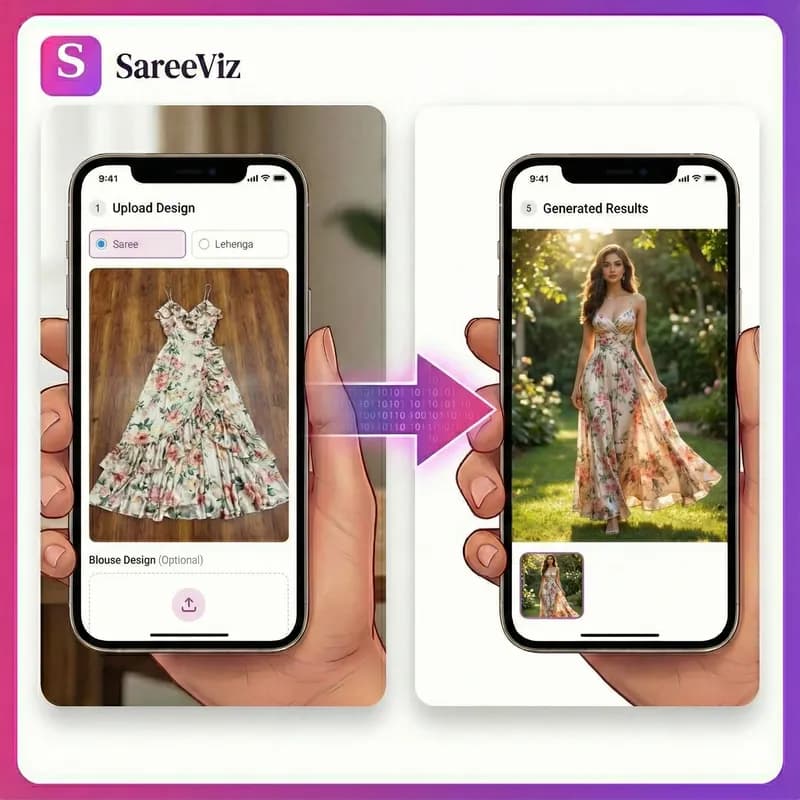
Supported apparels
- • Sarees
- • Lehengas
- • Men's Kurtas
- • Kurtis
- • Salwar suits
- • Men's Dress
- • Women's Dresses
- • Stoles/Shawls
- • Men's Innerwear
- • Women's Innerwear
- • Jewelry
Try for FREE
200K+
catalogue images generated
3K+
Indian sellers
8K
max output resolution
The catalogue bottleneck is photography
If you sell online, you already know the pattern: new stock arrives faster than it gets photographed, so designs sit unlisted, and unlisted designs sell nothing. A studio cycle costs ₹500 to ₹1,000 per image and books out weeks ahead. That maths is why most catalogues stay half-photographed.
The AI route inverts it: photograph each design once with your phone, upload, and get an on-model catalogue image back in about a minute. If you are pricing up studios right now, the catalogue photoshoot arithmetic, per design sets the two routes side by side, and our clothing photoshoot guide covers planning a shoot, what studios charge, and when a real shoot is still worth paying for.
One master image, every marketplace
Every platform asks for something different: Amazon wants a pure white main image, Myntra and Flipkart prefer light grey, Instagram and WhatsApp catalogues favour tall portrait. Working sellers resolve this in one move: generate a single high-resolution portrait master per design, then crop it per destination. In our analysis of 207,556 generated images, three quarters of sellers chose exactly that: 4K portrait, cropped where a platform demands square.
You do not have to work those rules out yourself. Pick your marketplace in the dashboard and the poses, background, model and output size are set to what it publishes, then locked so the whole set matches. The marketplace guide lists what Myntra, Amazon, Flipkart and Meesho each ask for and exactly what the preset sets for it.
If you are still choosing a tool, our ranking of AI fashion model generators compares seven of them honestly, and the AI photoshoot guide covers the workflow end to end, from input photos, model choice, and the mistakes that waste credits.
Selling on Meesho or Amazon
The two marketplaces ask for very different things. Meesho wants a clear front image in JPEG with no logo or watermark and sets no rule on shape or background; Amazon wants a pure white main image on a model and five to seven photos. Each has its own page with the full rules and what the preset makes: Meesho product photography and Amazon photoshoot for clothing.
Ethnic wear is where this matters most. Sarees and salwar suits are separate pieces that have to be draped together, and that is exactly the case general product-photo tools get wrong, putting the blouse on the wrong garment or failing to match the drape to the design. Marketplace photography lives or dies on that detail, because the buyer is judging a saree they cannot touch.
Questions sellers ask
Which marketplaces do the images work for?
Meesho, Amazon India, Myntra and Flipkart, plus your own store and WhatsApp catalogue. Each platform has its own rules. Meesho asks for a clear front image in JPEG with no logo or watermark, Amazon wants a pure white main image at 1500px or more on the long side, and Myntra and Flipkart prefer light grey. The practical approach is one high-resolution master per design, cropped or regenerated per platform.
Is there a preset for Meesho?
Yes. Pick the Meesho preset and each design comes out as front, side and back views on a light grey background, in 3:4 portrait. The preset leaves your branding as you set it, so switch off your own logo or watermark before you generate. Our Meesho product photography page covers Meesho’s rules in full.
What products can I photograph?
Sarees, salwar suits, lehengas, kurtis, dresses, menswear, innerwear and jewellery. Ethnic wear is the speciality: sarees and suits involve separate pieces draped together, which general tools mishandle and this one is built for.
What do I upload?
One clear phone photo per design: flat-lay or hanger shot in daylight, whole garment in frame, plain background. For sarees, add the blouse piece as a second photo and both get draped as one outfit.
How fast is it really?
About a minute per image once your photo is uploaded. A catalogue of 100 designs is an afternoon of work from photos you already have, against weeks for a studio cycle. Budget two or three attempts per design to get the image you keep. Retries are the workflow, not a failure of it.
Do buyers accept AI images?
Buyers judge whether the product looks clear and true, and marketplaces accept AI-generated listing images that meet their content rules. What matters is that the design, colour and details in the image match what arrives, which is exactly what the tool preserves from your photo.
Simple, credit‑based pricing
₹100 + GST$1.15
10 credits
₹500 + GST$5.75
50 credits
₹1,000 + GST$11.50
100 credits
₹5,000 + GST$57.50
515 credits
15 bonus credits
₹10,000 + GST$115.00
1,030 credits
30 bonus credits
₹20,000 + GST$230.00
2,075 credits
75 bonus credits
Credits expire 90 days from the date of purchase. See Terms.
Every resolution, video rate and credit pack is set out in one place. See full pricing.
Guides
Learn how to get the best results
Step-by-step guides for every garment: what each upload slot controls, how to prepare your design photo, and how to fix a result that does not look right.