Shared guide
Marketplace presets: Myntra, Amazon, Flipkart & Meesho
Pick where you sell and the poses, background, model and size are set for you. Then upload your design and tap Generate Images.
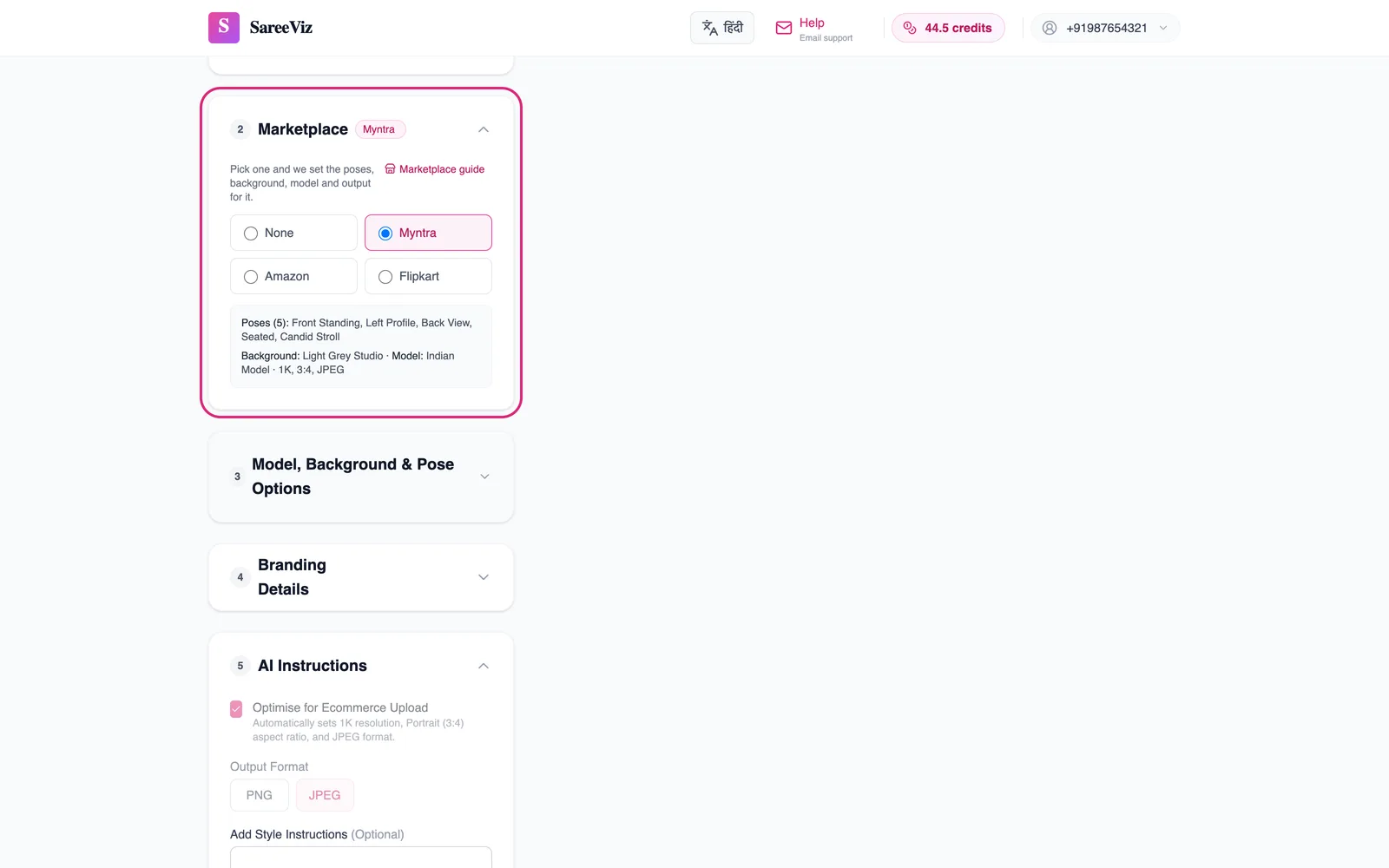
How it works
Open Marketplace (section 2) and pick one. It sets the poses, background and model in section 3, and the output under AI Instructions. Myntra, Amazon and Flipkart publish a minimum photo size that 1K cannot reach, so those three are 2K, Portrait 3:4, JPEG. Myntra and Amazon then get their exact size: 1080 x 1440 under 1 MB for Myntra, and 1500 x 2000 for Amazon. Meesho publishes no size rule, so it stays at 1K and ticks Optimise for Ecommerce Upload. You can still change any of them afterwards. On Myntra, Amazon or Flipkart, a size below 2K comes out under that marketplace's minimum. Picking a marketplace also switches section 3 to Model Photography. Your Model Image upload stays open, so you can keep your own model, except for innerwear, which has no Model Image upload.
Listing the same design on several platforms, and on your own store too? The other way to do it is one high-resolution master per design, cropped per destination, which the ecommerce photography page sets out.
Selling on your own Shopify store? Our guide to Shopify product image size covers square or portrait for a full-length saree.
What each marketplace asks for, and what we set
| Myntra | Amazon | Flipkart | Meesho | |
|---|---|---|---|---|
| Views | Front, side and back; details such as embroidery as separate photos | Front on the main photo, then back and a close-up | Front and back; a side view is a good extra | A clear front image; more recommended |
| Photos per product | 5 to 7 | 5 to 7 | At least 2, 3 preferred | At least 1, more recommended |
| Minimum photo size | 1080 x 1440 px | 1,500 px on the longest side | 1000 x 1000 px | No published rule |
| Background | Light grey with a soft shadow | Pure white on the main photo | Light grey with a soft shadow | No published rule |
| Model | Well-fitted garment, hands off the product | Standing, garment filling most of the frame | The same model in every photo | No published rule |
| Text or watermark | Not allowed | Not on the main photo | Not allowed | No logo or watermark |
| Poses we set | 5: Front Standing, Left Profile, Back View, Seated, Candid Stroll | The same 5 | 3: Front Standing, Left Profile, Back View | The same 3 as Flipkart |
| Background we set | Light Grey Studio | Pure White Studio | Light Grey Studio | Light Grey Studio |
| Output we set | 1080 x 1440 JPEG under 1 MB (made at 2K) | 1500 x 2000 JPEG (made at 2K) | 2K, 3:4, JPEG | 1K, 3:4, JPEG |
| Credits per design | 7.5 | 7.5 | 4.5 | 3 |
Already have a photo in the wrong size for one of these? Our free image resizer makes each marketplace’s size in your browser.
A guide for each marketplace
Each one has that marketplace’s rules in full and every photo its preset makes, from the same saree.
Innerwear
Innerwear has presets too. A few things differ from clothing:
| Clothing | Innerwear | |
|---|---|---|
| Poses | 5 on Myntra and Amazon, 3 on Flipkart and Meesho | 3 everywhere: front, side, back |
| Shape on Amazon | Portrait 3:4 | Square |
| Shape elsewhere | Portrait 3:4 | Portrait 3:4 |
| Second garment slot | Bottom, on kurtas, kurtis and dresses | Bottom, for the brief or panty |
| Credits per design | 7.5 on Myntra and Amazon, 4.5 on Flipkart, 3 on Meesho | 4.5 on Myntra, Amazon and Flipkart, 3 on Meesho |
- A seated or walking shot tells a buyer nothing about a vest or a bra, so innerwear stops at three views.
- Amazon asks for 5 to 7 photos, but the rest are detail and packaging shots a pose preset cannot make.
- Amazon is the only one of the four with an image rule for intimates, and it recommends square for underwear.
- Upload the brief or panty in Bottom Design and both pieces are worn together, each keeping its own colour.
- Upload only the top piece and the rest is plain: a vest with dark trousers, a bra with plain briefs in its own colour.
- Innerwear has no model or background controls and no Model Image upload, so the preset’s Indian Model and studio background are what you get.
See innerwear photography for the full set and example photos.