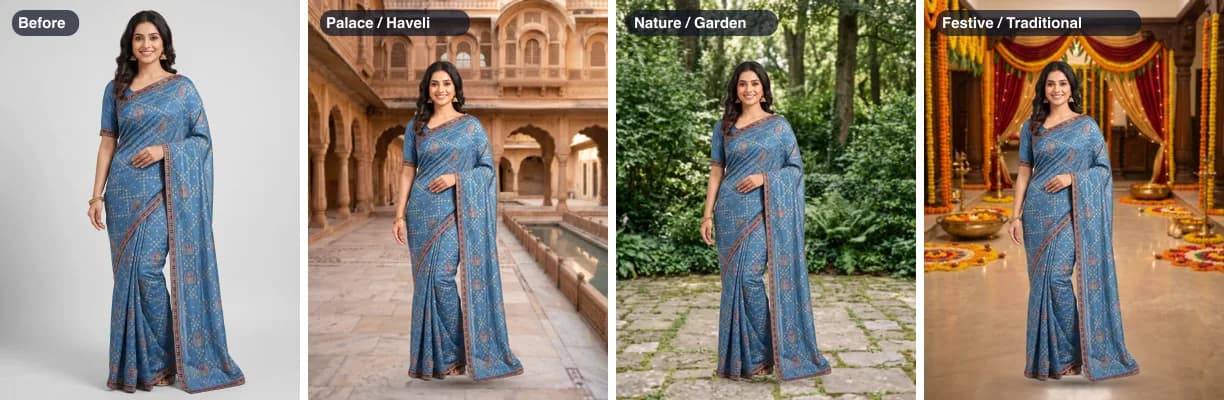
Which background to choose
| Background | Good for |
|---|---|
| Studio White | Amazon's main photo, which must be pure white (#ffffff) |
| Light Grey | Myntra and Flipkart clothing photos (#f2f2f2); Myntra's size is 1080 x 1440 |
| Warm Off-White | A softer, warm off-white (#ebe5dc) for your own website, catalogue or WhatsApp |
| Custom colour | Matching your brand colour or a banner |
| 7 scenes | Instagram and Facebook posts, WhatsApp status, your own shop, festive offers |
| Your photo | Your own shop front, showroom wall or a place your buyers know |
For a marketplace photo on white or grey at the exact size, the white background tool starts there, with Amazon’s 1500 x 2000 ready.
The 7 scenes
They carry the same names as the backgrounds in the SareeViz app, so a photo made there can be moved to another of them here: Nature / Garden, Palace / Haveli, Elegant Outdoor, Festive / Traditional, Indoor Home, Golden Hour Glow and Urban / Architectural.
Each one is an empty place with an open patch of floor in the middle, seen from about chest height, the way a full-length catalogue photo is taken. They suit a model standing full length. A saree laid flat or folded looks odd standing on a garden path, so put flat and folded products on a plain colour.
Making it look real, not pasted on
- Feet on the floor. The photo starts standing on the scene’s floor, in the middle. Drag it with the mouse, or use the sliders on a phone, to move it.
- A soft shadow. A light shadow under the feet stops the model floating. It is left off when your photo is cut off above the feet.
- A light background blur. As a real camera focused on the model would give. Turn it up to hide a scene that does not quite match.
- A small light match. The photo is made at most 8% brighter or darker, and a touch warmer or cooler, to sit in the scene. It is off at first, so your garment’s colours stay exactly as shot; tick it when blending in matters more.
The best results come from a photo where the model stands full length, lit evenly from the front, with some floor showing around the feet. That is also what the background remover handles best, and it is the same cut-out.
Where it struggles
- See-through cloth. Net, organza and chiffon keep the old background showing through them, which stands out against a new scene.
- Hair against a busy background. Loose strands in front of leaves or a patterned wall can keep bits of the old background, or lose their tips.
- Light from a different side. A photo lit from the left stays lit from the left. The light match only nudges brightness and warmth; it cannot move the sun.
- Very large photos. The scenes are 1792 x 2400 pixels, so on a big photo they are enlarged and look softer, much like an out-of-focus background.
- Old shadows. The shadow your photo had on its old floor goes with the old background; the new one is a soft, simple shadow.
How to change a photo’s background

- 1
Choose your photo
A JPEG, PNG or WebP from your phone or computer. It opens in your browser and is not uploaded.
- 2
Wait for the cut-out
The first time, the 48 MB background-removal model downloads once. Then the old background is removed in seconds.
- 3
Pick the new background
Studio White, Light Grey and Warm Off-White, a custom colour, one of the 7 scenes, or a photo of your own.
- 4
Place the photo
Drag it with the mouse, or use the size and position sliders. Keep the shadow on so the feet sit on the floor.
- 5
Pick a size and download
Keep your photo's own size or pick a marketplace or Instagram size, set a file size limit if you need one, and download as JPEG or PNG.
Planning the rest of a listing? Our marketplace image guide lists the photos, sizes and backgrounds each marketplace asks for.
Background is fine but the file is too heavy for a form or a marketplace? The image compressor gets a photo under any file size without changing anything else.
Questions about changing a photo's background
Is this photo background changer really free?
Yes. There is no login, no credits, no watermark and no limit on the number of photos. The work is done by your own phone or computer, so it costs us nothing to run.
Is my photo uploaded anywhere?
No. The first time you use it, your browser downloads the background-removal model (48 MB) and keeps it. Your photo, and any background photo of your own, stay on your device and are never sent to SareeViz or anyone else. The scene backgrounds are downloaded only when you open the scene list.
Can I use a scene background on Amazon, Myntra or Flipkart?
Not for the main photo. Amazon wants the main photo on pure white (#ffffff), and Myntra and Flipkart want clothing on light grey (#f2f2f2); both are under Plain colour. Scenes suit Instagram, WhatsApp, Facebook, your own website and extra lifestyle photos. Check each marketplace's rules before using a scene in a listing.
How do I make the model look like they are really standing there?
Pick a scene with light like your photo's: soft daylight for a studio or outdoor photo, a warm room for an indoor one. Keep the soft shadow on, and try ticking Match the light to the scene, which is off at first so your colours stay exact. If the feet look too high or too low, move the photo down or up until they sit on the floor, and make it a little smaller if the model looks too tall for the room.
Can I use my own background photo?
Yes. Choose Your photo and pick any JPEG, PNG or WebP: your shop, a wall, a street. A photo taken from about chest height with the floor showing works best, because that is how most catalogue photos are taken. It stays on your device.
Why does the background look softer than my photo?
Two reasons. The light blur, on unless you turn it off, makes the background look like a real camera focused on the model. And our scenes are 1792 x 2400 pixels, so for a bigger photo they are enlarged. Turn the blur off if you want the background as sharp as it can be.
What does it get wrong?
See-through net, organza and chiffon keep the old background showing through the cloth, which looks odd on a new scene. Loose hair against a busy old background can keep bits of it. And the light will not match perfectly: a photo lit from the left will still be lit from the left in a scene where the sun is behind.
I use SareeViz. Can I change the background of a photo it made?
Yes. Open the photo on your dashboard and click Change background. This page opens in a new tab with that photo already loaded. A photo you have not downloaded yet still carries its preview watermark.
Sources
Checked 30 October 2026.
- Amazon India Seller Central: Image guidelines for clothing: pure white main image, size rules
- Fynd: Myntra image guidelines for sellers: 1080 x 1440 minimum, 3:4, JPEG, 500 KB to 1 MB, light grey for clothing
- Fynd: Flipkart image guidelines for sellers: 1000 x 1000 minimum, JPEG, light grey for clothing
- BiRefNet on GitHub (Peng Zheng et al.): the open model the background remover runs, MIT licence