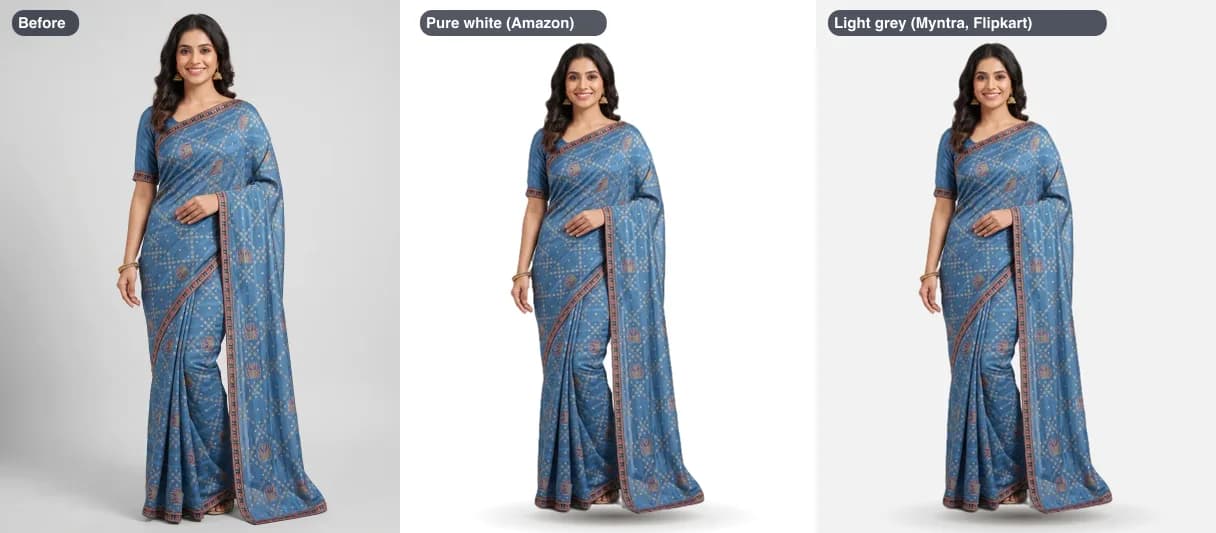
White or light grey: what each marketplace asks for
| Where | Background | Size the tool makes |
|---|---|---|
| Amazon | Pure white on the main photo | 1500 x 2000 |
| Myntra | Light grey for clothing | 1080 x 1440, under 1 MB |
| Flipkart | Light grey for clothing | 1000 x 1000 |
| Meesho | No published rule | Your photo's own size, as JPEG |
Picking a size in the tool sets the background with it: Amazon to white, Myntra and Flipkart to light grey. You can still change it afterwards. Our marketplace image guide has each one’s full photo rules.
How to put a product on a white background

- 1
Choose your photo
A JPEG, PNG or WebP of the product, worn or laid flat. It opens in your browser and is not uploaded.
- 2
Wait for the cut-out
The first time, a 48 MB model downloads once. Then the background is removed in seconds.
- 3
Pick white or light grey
White for Amazon. Light grey for Myntra and Flipkart clothing. Transparent if you want to add your own background later.
- 4
Pick the marketplace size
The empty space around the product is trimmed, then the product is centred with the new background filling the gap, so nothing of it is cropped off.
- 5
Download
Compare the before and after, check the size and file size, and tap Download.
White is only one of Amazon’s main-photo rules. No props, text or logos, and the product filling the frame, are the others; our Amazon image guide has the full list.
Getting a clean result
- Leave some floor or wall showing around the garment. A saree spread to fill the whole frame gives the tool nothing to remove.
- A plain backdrop in a different colour from the garment gives the cleanest edge. Navy cloth on a dark sheet is hard to separate.
- Hang the garment or lay it on a table rather than holding it up. Hands holding the cloth are kept as part of the product.
- Net, organza and chiffon come out solid, with the old background still visible through them. For a see-through dupatta, shoot it against a plain wall.
Need it see-through instead? The background remover starts on transparent and saves a PNG you can place on any background.
Want the product somewhere other than white or grey, such as a palace courtyard or your own shop? The photo background changer uses the same cut-out and puts it in a scene.
Already on white and only the size is wrong? The product image resizer skips the cut-out and adds a white or grey border to reach the size.
Questions about white background photos
How do I make a product photo background white?
Choose the photo here and the background is removed and replaced with pure white in your browser. Pick a marketplace size if you need one, then download. There is no login and the photo is not uploaded.
Which marketplaces want a white background?
Amazon asks for a pure white main photo, RGB 255, 255, 255. Myntra and Flipkart ask for clothing on light grey, not white, which is why their sizes here switch the background to light grey (#f2f2f2). Meesho publishes no background rule.
What size should an Amazon white background photo be?
Amazon asks for at least 1,500 pixels on the longest side, with the product filling at least 85% of the frame. The Amazon preset makes 1500 x 2000 on white. The tool first trims the empty space around the product (on by default), so the product fills the frame.
Is the white really pure white?
Yes. The background is filled with #ffffff, which is RGB 255, 255, 255, the value Amazon checks for.
Can I keep the file under 1 MB?
Yes. Pick a limit under Maximum file size and the tool finds the highest JPEG quality that fits. Myntra's size starts at a 1 MB limit, since Myntra accepts 500 KB to 1 MB per photo.
What does it get wrong?
See-through net, organza and chiffon come out solid, with whatever was behind them still showing through the cloth. A garment the same colour as its background can lose part of its edge. Hands holding the cloth are kept. Check the after photo before you upload it.
Is my photo uploaded?
No. The first time, your browser downloads the 48 MB background-removal model from our site and keeps it. Each photo is then processed on your own phone or computer and never sent anywhere.
Sources
Checked 29 October 2026.
- Amazon India Seller Central: Image guidelines for clothing: pure white main image, size rules
- Fynd: Myntra image guidelines for sellers: 1080 x 1440 minimum, 3:4, JPEG, 500 KB to 1 MB, light grey for clothing
- Fynd: Flipkart image guidelines for sellers: 1000 x 1000 minimum, JPEG, light grey for clothing
- Meesho: selling sarees online: JPEG, no logo or watermark, a clear front image
- BiRefNet on GitHub (Peng Zheng et al.): the open model the background remover runs, MIT licence