AI Saree Photography for your catalogue
Showcase your sarees on professional models instantly. Perfect for catalogs and social media.
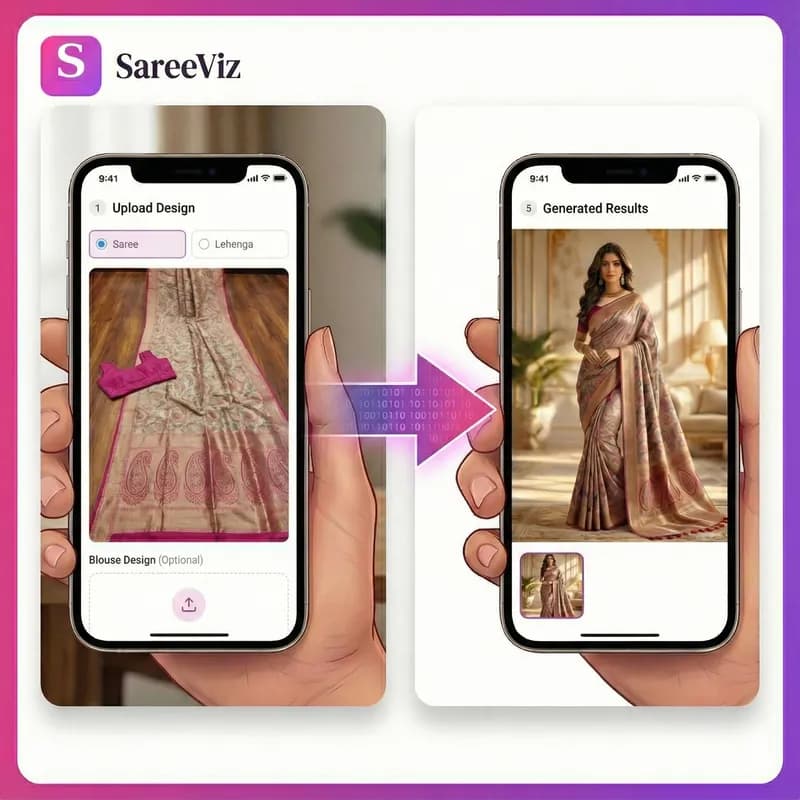
Supported apparels
- • Sarees
- • Lehengas
- • Men's Kurtas
- • Kurtis
- • Salwar suits
- • Men's Dress
- • Women's Dresses
- • Stoles/Shawls
- • Men's Innerwear
- • Women's Innerwear
- • Jewelry
Try for FREE
200K+
catalogue images generated
3K+
Indian sellers
8K
max output resolution
From the photo you have to the photo the listing needs
Your sarees arrive from the loom or the godown flat. Your listing needs them draped on a person, in light that shows the colour truthfully, with the border and pallu doing the selling. Between those two photos there used to be a studio booking, a model, a draping expert and a week of waiting. Now there is an upload.
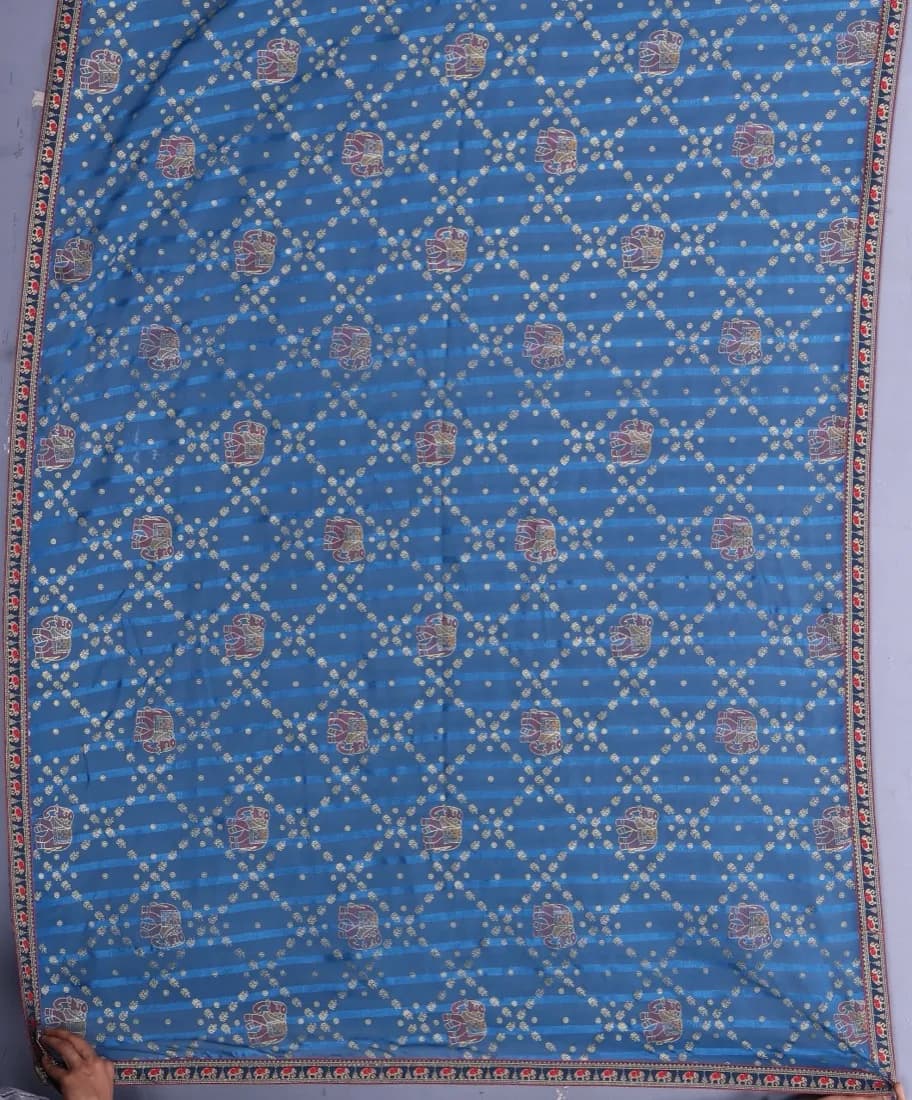
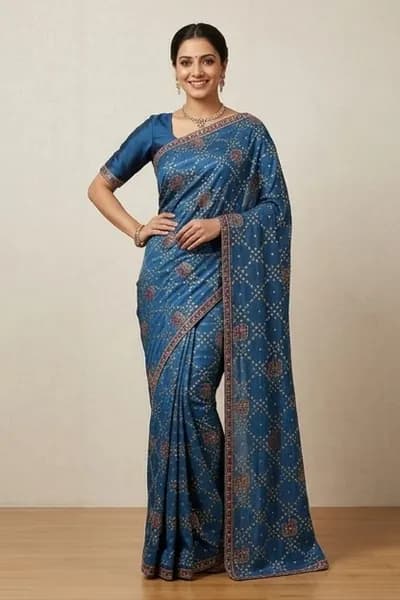
A real pair: the image on the right was generated from the photo on the left. Same border, same lattice, same trim. This one input also produced every image in our pose guide.
A saree is two garments, and the tool knows it
A saree ships as six metres of drape fabric plus a blouse piece. Generic photo tools see one image and one garment, which is why their saree results disappoint: the blouse gets ignored or mangled, and the drape ignores how a pallu actually falls. SareeViz takes the saree and the blouse as separate uploads and drapes them as one outfit. In our analysis of 207,556 catalogue images, 69% of saree jobs used that separate blouse upload. It is not an edge case, it is how sarees work.
If you are weighing options first, our comparison of AI saree photography tools ranks seven tools including ours, and the saree photo editing guide walks through the whole process step by step. For drape styles specifically, see saree draping software. Selling intimates alongside your ethnic range? AI innerwear and lingerie photography covers that category, where booking a model is hardest. And if it is a whole season you are costing rather than one design, the catalogue photoshoot arithmetic works it out per design against a studio quote.
The drape decides what a buyer can judge
Six metres of fabric can be worn a hundred ways, and the way you choose decides which part of your saree a buyer ever sees. A drape is not styling. It is a claim about where your design lands on a body.
Nivi
Pleats tucked at the waist, pallu over the left shoulder and down the back. It is the drape buyers across the country read without thinking, and it shows the body of the saree in the pleats and the border along the hem. The pallu, though, ends up in profile. Safe default for a catalogue that sells nationally.
Bengali atpoure
The pallu goes over the left shoulder, round the back and up over the right, so it reaches the front twice. On a red and white garad, or a jamdani whose value sits in the pallu and the border, that is the difference between a listing that shows the product and one that hides it.
Gujarati seedha pallu
The pallu comes over the right shoulder and spreads flat across the front. If the heavy work is on the pallu, this is the drape that sells it, because the buyer sees the work face on rather than edge on. It is how a patola, a gharchola or a heavy bandhani is worn in Gujarat and Rajasthan, and how those buyers expect to see it listed.
Half-saree and lehenga style
The drape pinned over a skirt instead of pleated into the waist. It suits heavy silks that will not pleat softly, and buyers who want the look without the wrap. It also gives a wide, even hem, which is the best showcase a deep border will get.
Then the practical part: think about the thumbnail. On a marketplace grid a buyer meets your saree at roughly the size of a stamp, cropped to the middle of the frame. Whatever the drape puts on the model’s back does not exist at that size. If your money is in the pallu, get the pallu to the front.
One honest note on what this tool does here. The drape it generates sits in the contemporary Nivi family, and the draping preview exists to tell the AI which of your uploaded designs belongs to the pallu, which to the pleats and which to the border, rather than to switch between regional styles. Style follows the pose you pick and the instruction you write. If showing one saree in three named regional drapes is the actual job, our comparison of saree draping software names the tool built for that, including one that is not ours.
Every fabric photographs differently
The tool copies what is in your photo, so the fabric decides how you shoot, not how you generate. Five behaviours cover almost every saree in an Indian catalogue.
- Silk, so Kanjeevaram, Banarasi, Paithani and tussar. Stiff enough to hold a sculpted pleat, and reflective enough to throw a hard highlight. In direct sun the fold nearest the light blows out to white and takes the colour with it. Shoot in open shade or by a window with the sun off the fabric, and the weave stays readable.
- Cotton and handloom. Matte, absorbs light, pleats crisply and photographs honestly. The risk is the opposite one: a flat, dull frame that undersells a good weave. This is the fabric where a close-up of the texture adds the most, because the weave is the product.
- Georgette and chiffon. No body at all when laid flat, so they read as a puddle of colour on a table. Everything worth paying for, the fall, the swing, the way pleats separate as the model moves, only exists on a person. This is the category where an on-model image beats a flat lay by the widest margin, and where a walking or turning pose beats a straight stand.
- Organza and tissue. Translucent and reflective at the same time. Whatever sits behind the fabric comes through it, so a dark table under an ivory tissue saree drags the colour grey, and the tool faithfully copies the grey. Shoot on plain white or light grey, never on wood or a patterned bedsheet.
- Zari, border and surface work. Metal thread only looks like metal when light reaches it at an angle. A straight-on phone flash flattens zari into a beige stripe, and a beige stripe is what gets reproduced. Photograph the border on its own, straight on, in daylight, and upload that as its own close-up so the work survives at listing size.
None of this is about the AI. It is about what your photograph contains, which is the one part of the job still in your hands.
What to photograph before you upload
Four photos cover almost every saree, and most sarees need only the first one.
- The full saree, flat or hanging, cropped so only fabric is in the frame. This photo decides the colour, the fabric and the border in every output, so use your original product photo and never an image the tool generated earlier.
- The blouse piece alone, cropped tight, with no saree fabric anywhere in the frame. A blouse photo with the border creeping into one edge is the commonest reason a blouse design turns up on the pleats.
- The pallu alone, but only when the pallu carries a design the full-saree photo cannot show clearly. On an all-over print, skip it.
- The border or the buti, straight on, only when the work is fine enough to be lost at full-saree scale.
The shooting rules are short. Daylight, no filter and no beautify mode, a plain white or light grey surface, the whole saree in frame, the file a couple of MB rather than fifteen. And stop at four: seven overlapping photos of one repeating print give the AI seven instructions to reconcile, and the result is worse than one good photo. The step-by-step, slot by slot, is in the saree photoshoot guide, and the cropping detail is in preparing your design photo.
What a marketplace wants from a saree listing
Myntra, Amazon and Flipkart each publish a minimum photo size that a 1K image cannot reach, and each asks for a different set of views. Meesho publishes no size rule at all. None of the four allow a logo or a watermark on a listing photo, which rules out the shop-name overlay that a lot of WhatsApp catalogue images carry.
Rather than ask you to hold those rules in your head, pick the marketplace in the app and the poses, background, model and output size are set to what that platform publishes, then locked so every photo in the set matches. The marketplace guide lists what each one asks for and exactly what the preset sets, with the full photo set generated from a single saree so you can see the difference before you spend anything.
What one saree costs to photograph
Images are priced in credits by resolution, and a credit is ₹10. That is ₹10 for a 1K image, ₹15 at 2K, ₹20 at 4K and ₹25 at 8K, before 18% GST. There is no subscription, so nothing runs in a month you do not shoot.
A marketplace preset makes a fixed set of photos per design, which turns that rate into a per-design price you can plan a season around:
| Marketplace | Photos per design | Resolution | Per design |
|---|---|---|---|
| Meesho | 3 | 1K | ₹30 |
| Flipkart | 3 | 2K | ₹45 |
| Myntra | 5 | 2K | ₹75 |
| Amazon | 5 | 2K | ₹75 |
So a forty-design season run as a Meesho ecommerce photoshoot is ₹1,200 before GST, and the same forty designs shot for Myntra, at five photos each and a higher resolution, are ₹3,000. The smallest pack is ₹100 for 10 credits, which is enough to photograph 10 designs at 1K and judge the output on your own fabric before spending more. The full rate card, including video, is on the pricing page, and the arithmetic against studio rate cards is in our guide to product photography cost in India.
Questions saree sellers ask
What photo of the saree do I need?
One clear photo: laid flat, on a hanger, or held up. Phone camera in daylight is enough. Keep the whole saree in frame, avoid dark-on-dark backgrounds, and keep the file under a couple of MB. The border and pallu should be visible, because that is what the tool preserves.
What happens to the blouse?
Upload the blouse piece as a second photo and the tool drapes both together as one outfit. If you skip it, a blouse is matched to the border automatically. In our own data, 69% of saree jobs include a separately uploaded blouse. A saree is two garments, and the tool is built around that.
Will the design stay accurate?
The border, the pallu, the colours and the work stay the ones you photographed, because the job is draping and presentation rather than redesign. That accuracy on the details buyers zoom into is the reason to use a saree-specific tool rather than a general photo tool.
Can I use the images on Meesho, Amazon and Myntra?
Yes. Output resolution and framing meet the marketplace listing rules, and you can generate portrait for your catalogue and crop square where a platform asks for it. All three accept AI-generated listing images that show the product clearly.
Can I get different poses and drape styles?
Yes: standing, seated, walking, close-up and more. Our pose guide shows every pose on the same saree so you can compare them honestly before choosing. Most sellers pick one good pose per design and move on; the option is there when you want variety.
Which drape should I photograph my saree in?
For a marketplace catalogue that sells across India, the contemporary Nivi drape is the safe answer, because it is the one every buyer reads without thinking. Switch only when the work is on the pallu and a front-pallu drape would show it face on, or when you sell to one region that wears its own drape. The rule underneath is simple: the drape decides which part of your saree ends up in the thumbnail.
Does silk need a different photo from georgette?
The generation is the same; your input photo is not. Silk throws a hard highlight, so shoot it in open shade rather than direct sun or the fold nearest the light blows out to white. Cotton is matte and honest but dull, so a close-up of the weave is worth adding. Georgette and chiffon have no body when flat, which is exactly why an on-model image earns the most on them. Organza and tissue are translucent, so shoot them on white or light grey and never on a dark or patterned surface.
How much does it cost to photograph one saree?
Images are priced in credits by resolution, and a credit is ₹10. One image is ₹10 at 1K, ₹15 at 2K, ₹20 at 4K and ₹25 at 8K, before 18% GST. A three-photo Meesho set for one design is ₹30 and a five-photo Myntra set is ₹75. The smallest pack is ₹100 for 10 credits, with no subscription.
I sell the same design in six colours. Do I need six photos?
Yes. The colour, the fabric and the border all come from the photo you upload, so each colourway needs its own photo of that colourway. That is also the case where this route pays for itself fastest, because a studio would charge you six sittings for what is really one design.
Can I photograph a saree without booking a model at all?
That is the whole point. There is no model to book, no draping expert, no studio slot and no reshoot when one colourway sells out. You photograph the fabric yourself, the way you already do for the listing, and the model is generated around it.
Simple, credit‑based pricing
₹100 + GST$1.15
10 credits
₹500 + GST$5.75
50 credits
₹1,000 + GST$11.50
100 credits
₹5,000 + GST$57.50
515 credits
15 bonus credits
₹10,000 + GST$115.00
1,030 credits
30 bonus credits
₹20,000 + GST$230.00
2,075 credits
75 bonus credits
Credits expire 90 days from the date of purchase. See Terms.
Every resolution, video rate and credit pack is set out in one place. See full pricing.
Guides
Learn how to get the best results
Step-by-step guides for every garment: what each upload slot controls, how to prepare your design photo, and how to fix a result that does not look right.