Professional Jewellery Photography with AI
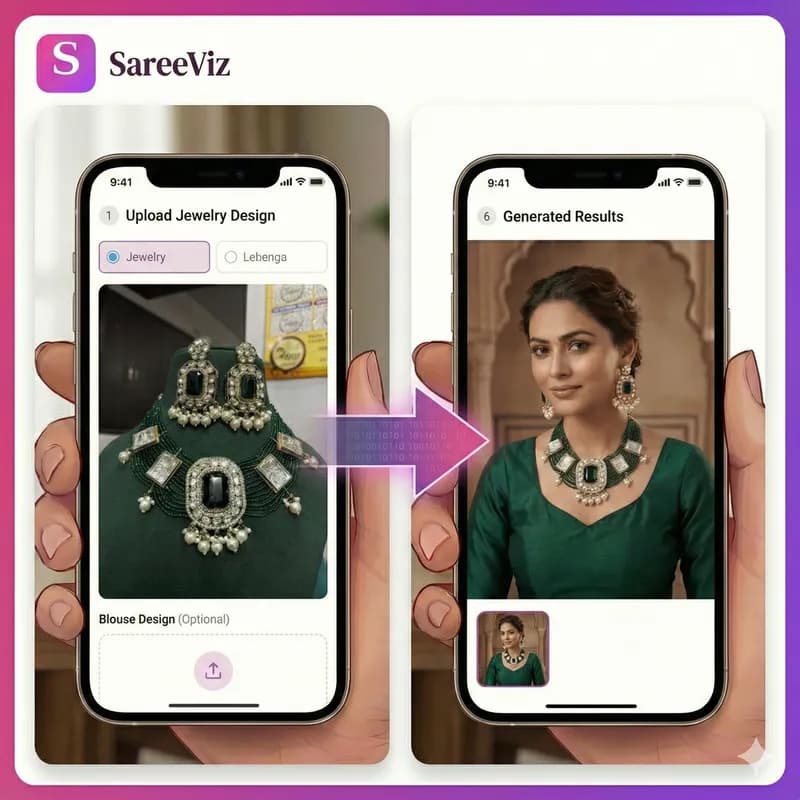
Necklaces, earrings and mangalsutras, worn on a model. From one product photo.
Supported Jewelry
- • Necklaces
- • Earrings
- • Pendants
- • Rings
- • Mangalsutras
- • Bracelets
Try for FREE
200K+
catalogue images generated
3K+
Indian sellers
8K
max output resolution
Why jewellery listings need a worn shot
A flat photo shows the design. It does not answer the questions a buyer actually has: how long is the drop, how does it sit against a neckline, how big is it next to a real face. That is why the listings that convert show the piece worn, and why a jewellery photoshoot with a model used to be the expensive, unavoidable step.
SareeViz replaces that step. You upload one clear photo of the piece, pick a model, and download a worn-on-model image in about a minute. The piece stays exactly as you photographed it, down to the stones, the finish and the chain. Only the presentation changes. It works for gold, kundan, American diamond, oxidised silver and imitation pieces alike.
One honest note from our own usage data: jewellery sellers are earlier to this than apparel sellers, so there is less of a crowd. That is worth acting on rather than admiring. Scroll any jewellery category on an Indian marketplace and almost every listing is the same flat lay on the same velvet tray, which means a worn shot still reads as a better brand rather than as the minimum. Apparel sellers lost that advantage two years ago. If you are comparing tools first, our guide to AI jewellery photography tools ranks the options, including ours, with the trade-offs stated plainly.
Category by category, and what each asks of your photo
Jewellery is not one product. What a kundan set needs from a photograph is close to the opposite of what an American diamond set needs, and the tool reproduces whatever your photo gives it. Six families cover most Indian ethnic catalogues.
Kundan
Uncut stones held in gold foil, in closed settings, often with meenakari enamel on the reverse.
There is no fire to catch, so the value is in the setting and the enamel. Even, diffuse light keeps the foil reading as gold; hard direct light turns it into a white patch. Shoot the reverse as a second photo if the meenakari is part of what you are selling.
Polki
Uncut natural diamonds, flat-faced, glassy rather than fiery.
Polki looks flat and grey under soft light and comes alive at an angle. Turn the piece until the faces catch the light before you press the shutter, because whatever the photo shows is what the model will be wearing.
Temple jewellery
Antique gold finish, deity and coin motifs, heavy relief work.
The detail here is depth, not colour, so it reads by shadow. Flat frontal light erases the relief and the piece photographs as a gold blob. Light it from one side and let the motifs cast their own shadows.
Oxidised silver
Blackened silver, matte, usually tribal or boho shapes and large pieces.
Almost no reflectivity, so it vanishes against a dark or wooden surface. Shoot on plain white or light grey, which is the opposite of what feels natural for a dark piece.
American diamond
Cubic zirconia, cut to sparkle, usually in rhodium or gold-plated settings.
The entire pitch is brilliance, so a dull photo kills the product. A small point light at an angle gives the stones fire; a cloudy window gives you grey glass.
Pearl
Freshwater or shell pearls, often with gold or kundan spacers.
Lustre is the product, and lustre is a soft gradient, not a highlight. Hard light burns a white dot onto each pearl and flattens the rest. Diffuse daylight, no flash.
Model shot or bust shot
Both exist in the tool, and they are not competing. They answer different questions, and a good listing carries both.
A bust or mannequin shot is a product shot with a form under it. It keeps the piece the only subject, holds the same look across two hundred designs with no model to match, and sits comfortably as a main listing image on a white background. In the app it swaps the model and pose options for a display style reference, so you can set the surface and the lighting, marble, velvet or a studio set, and keep that look consistent across a collection.
A model shot answers the fit questions a product shot cannot. Where does this necklace actually fall. Does the mangalsutra sit above or below the neckline of a blouse. Are these jhumkas earrings you can wear to work or only to a wedding. For bridal and heavy sets the worn image is not the second photo, it is the first, because those pieces are bought as a complete look and the buyer is imagining herself in it.
The practical rule for a marketplace listing: bust shot as the main image, worn shot immediately after it, close-up of the setting third. For Instagram and WhatsApp, lead with the worn shot every time, because the flat lay is what everyone else is posting. The mechanics of the toggle are in the jewellery photoshoot guide.
The four hard parts, and where they actually bite
Jewellery is harder to photograph than clothing, and the reasons are specific rather than general.
- Polished metal is a mirror. A gold surface does not have a colour so much as it has a reflection, which is why studios shoot jewellery inside light tents. Your phone, your hands and the window all end up on the piece. You cannot fix that afterwards and neither can the AI, because the reflection is part of the photo it is copying. Shoot near a window with a white card or a sheet of paper on the dark side, and check the metal for your own reflection before you upload.
- Sparkle needs a hard light, and detail needs a soft one. These pull in opposite directions. Cubic zirconia and polki want a small, direct light source at an angle to throw fire. Kundan foil, pearl lustre and fine filigree want diffuse light that will not burn out. If a piece has both, shoot it twice and upload the better frame for the shot you are making.
- Scale is invisible on a flat lay. A two-inch jhumka and a four-inch one are the same photograph on a white background. Buyers know this, which is why size complaints and returns cluster in jewellery, and it is the single biggest thing a worn shot fixes. Marketplaces will not let you add a measuring scale or text to a listing image, so the model is your ruler.
- Drop length and neckline are a fit question. A choker, a princess-length chain, a matinee and a rani haar photograph almost identically flat and sit completely differently on a person, and half of what a buyer is deciding is whether it will work with the neckline she owns. A worn shot answers that in one glance. If you sell ethnic sets, showing the necklace against a blouse neckline rather than a bare shoulder answers it better still.
What a marketplace wants from a jewellery listing
Jewellery does not have a marketplace preset yet, so this is the one category where you set the output yourself. It is a short list. 2K clears the minimum photo size Myntra, Amazon and Flipkart each publish, which a 1K image cannot reach. Amazon asks for a pure white background on the main image. None of the four allow a logo or a watermark on a listing photo, so the shop-name overlay that works on a WhatsApp catalogue has to come off. Meesho publishes no size rule and simply wants a clear front image.
The marketplace guide carries each platform’s published rules in full, and the settings guide covers resolution, aspect ratio and format. If you sell clothing alongside jewellery, the clothing side does have presets, and the ecommerce photography page covers that flow.
What a piece costs to photograph
Images are priced in credits by resolution, and a credit is ₹10. One image is ₹10 at 1K, ₹15 at 2K, ₹20 at 4K and ₹25 at 8K, before 18% GST. Nothing is charged monthly, so a quiet season costs nothing.
Take the three-image set the listing rules above point at, a bust shot, a worn shot and a close-up of the setting, all at 2K. That is ₹45 a piece. A thirty-piece festive collection photographed that way is ₹1,350 before GST, and the same thirty pieces at one worn image each are ₹450. The smallest pack is ₹100 for 10 credits, which is enough to test the output on your own pieces before committing a collection to it.
The full rate card, including video, is on the pricing page. What the same work costs through a studio, and how the other AI tools price it, is set out in our comparison of AI jewellery photography tools.
Questions sellers ask
What kind of jewellery photo do I need to upload?
A clear photo of the piece on a plain background. A phone photo in daylight works: lay the necklace or earrings flat, avoid shadows and reflections, and capture the whole piece. The AI places it on the model from that single photo, and our jewellery photo guide shows what a good upload looks like for each kind of piece.
Can I show a necklace or mangalsutra actually worn on a model?
Yes, that is the point of the tool. A flat product shot shows the design; a worn shot shows the drop length, how it sits on the neckline, and the scale against a real body, which is what buyers are trying to judge before they order.
Do AI jewellery images work for Meesho and Amazon listings?
Yes. Both accept AI-generated images that show the product clearly and meet their resolution rules. Use the worn-on-model image alongside your plain product shots rather than instead of them, so buyers see both the design and the fit.
Is it jewellery or jewelry?
Both. Jewellery is the Indian and British spelling, jewelry the American one. Sellers in India search both ways, and this page answers either spelling the same.
Model shot or bust shot: which one should I use?
Both, for different slots. The bust shot is your main listing image, because it shows the piece cleanly, scales to a form, and stays consistent across a whole collection with no model to match. The worn shot is the one that answers drop length, neckline and size, so it earns its place as the second image and as the thing you post on social. Heavy bridal sets are the exception: they sell on the whole look, so lead with the worn shot. Switching between the two is one toggle, described in the jewellery photoshoot guide.
How much does one jewellery image cost?
Images are priced in credits by resolution, and a credit is ₹10. One image is ₹10 at 1K, ₹15 at 2K, ₹20 at 4K and ₹25 at 8K, before 18% GST. A three-image set for one piece, meaning a bust shot, a worn shot and a close-up at 2K, is ₹45. The smallest pack is ₹100 for 10 credits, and there is no subscription.
Will the stones and the metal stay exactly as in my photo?
The piece is reproduced from your photo, so the stones, the finish, the chain and the setting stay the ones you shot. That cuts both ways: a hard reflection, a colour cast or a burnt-out highlight in your input is reproduced just as faithfully. On jewellery more than on fabric, the input photo is most of the result.
How does a buyer judge the size of a piece from a photo?
Not from a flat lay, which is the core problem. A two-inch jhumka and a four-inch one look identical on a white background, and a choker and a matinee-length necklace photograph almost the same flat and sit completely differently on a person. A worn shot is the scale reference, and it is the one marketplaces allow, since none of them let you put a measuring scale or text on a listing image.
Is there a marketplace preset for jewellery?
Not yet. Presets currently cover clothing and innerwear, so for jewellery you set the output yourself. 2K clears the published minimum photo size on Myntra, Amazon and Flipkart, Amazon wants a pure white background on the main image, and none of the four allow a logo or watermark on a listing photo. The marketplace guide has each platform’s published rules, and the settings guide covers resolution and aspect ratio.
Does this work for earrings and rings, or only necklaces?
Necklaces, earrings, pendants, rings, mangalsutras and bracelets are all supported. The smaller the piece, the more a close crop matters: a ring at full-body scale is a few pixels, so generate it as a close-up rather than a standing shot, and keep the flat product photo as your main listing image.
Simple, credit‑based pricing
₹100 + GST$1.15
10 credits
₹500 + GST$5.75
50 credits
₹1,000 + GST$11.50
100 credits
₹5,000 + GST$57.50
515 credits
15 bonus credits
₹10,000 + GST$115.00
1,030 credits
30 bonus credits
₹20,000 + GST$230.00
2,075 credits
75 bonus credits
Credits expire 90 days from the date of purchase. See Terms.
Every resolution, video rate and credit pack is set out in one place. See full pricing.
Guides
Learn how to get the best results
Step-by-step guides for every garment: what each upload slot controls, how to prepare your design photo, and how to fix a result that does not look right.