Shopify Product Image Size for Ethnic Wear Stores (and How to Fill It)
Shopify’s help centre settles the question in one line: a square product photo of 2048 by 2048 pixels usually displays best. That is excellent advice for a candle. A saree is six metres of fabric worn by a woman who is a good deal taller than she is wide, and nobody asked it.
This guide takes Shopify’s numbers from its own pages and works out what they mean for sarees, lehengas, salwar suits and kurtis on your own store, starting with the question Shopify’s advice skips: square or portrait.
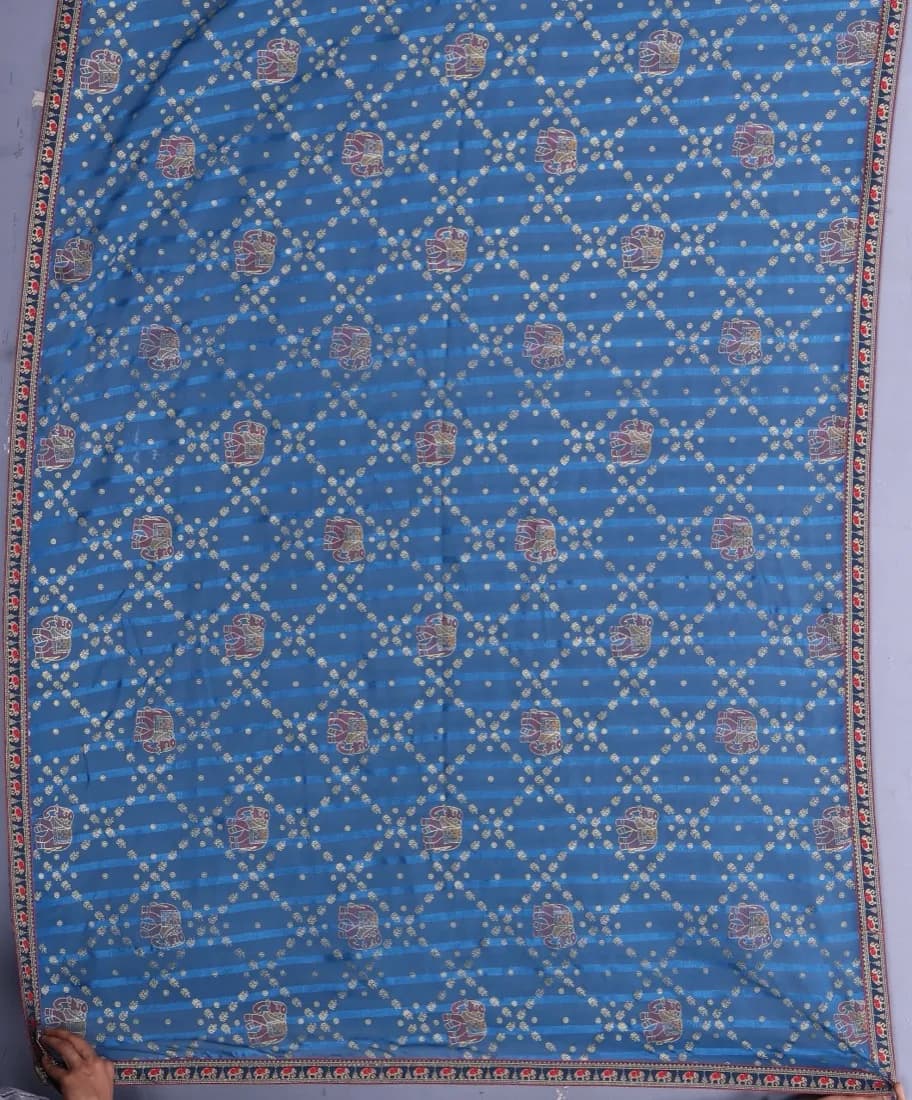
The flat photo a seller takes
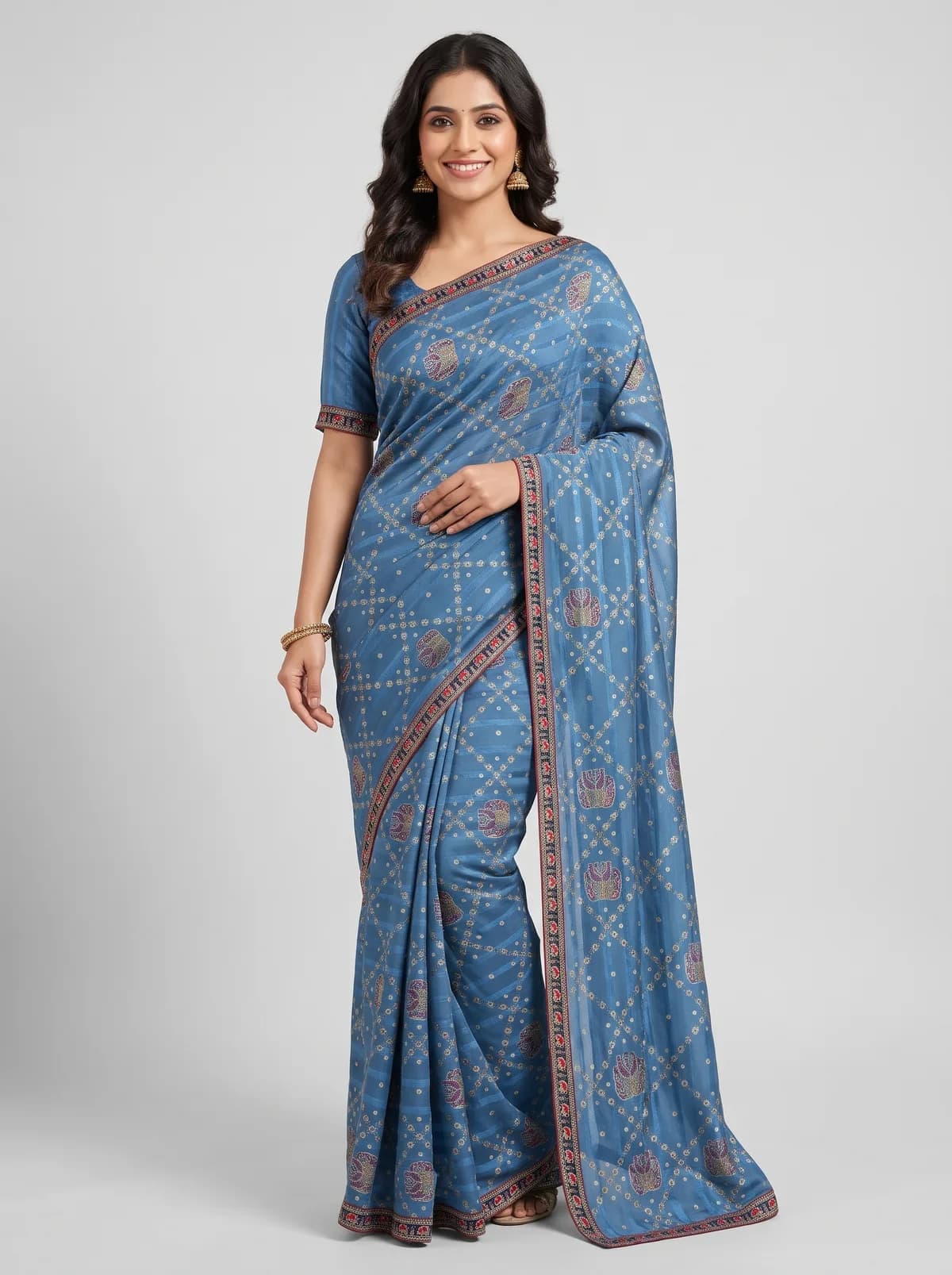
The product photo the store needs
What Shopify actually says about image size
Shopify publishes its image guidance across a few help pages rather than one. Here is everything it states about product photos, read on its own help centre in October 2026, with the page each line comes from listed under Sources.
| What | What Shopify says |
|---|---|
| Recommended size | 2048 x 2048 px usually displays best, for square product images |
| Largest size | Up to 5000 x 5000 px or 25 megapixels on one page; no more than 20 megapixels on another |
| File size | Under 20 MB |
| File type | PNG is best for most product images, then JPEG. TIFF, BMP, GIF, SVG, HEIC and WebP are also accepted |
| Shape | No required ratio, but use one consistent aspect ratio for the main image of every product shown side by side |
| Smaller copies | Shopify makes the smaller sizes your theme needs automatically |
| Alt text | Up to 512 characters; 125 or fewer recommended |
Two things in that table deserve a second look. The first is that Shopify contradicts itself on the ceiling: its product media page allows 25 megapixels, while its theme images page stops uploads at 20. Plan for the lower number and neither page can trip you.
The second is that 2048 x 2048 is a recommendation for square images, not a requirement that images be square. Shopify’s pages state no minimum size at all. What they do stress, on two separate pages, is consistency of shape.
Why shape matters more than size
Your collection page is a grid of cards, each showing a product’s main image. When every photo is the same shape, the rows line up. When one saree is portrait, the next is a square supplier photo and the third a landscape WhatsApp forward, the cards go uneven and the page looks like a jumble sale.
Shopify’s own troubleshooting page names inconsistent aspect ratios as the reason a grid shows uneven sizes on mobile, and its fix is to give the images one ratio.
The rule applies to main images only. The extra photos in a product’s gallery, such as the pallu close-up or the blouse back, appear one at a time on the product page and do not sit in the grid. Keeping them the same shape is tidier, but nothing breaks if a detail shot is square.
Square or portrait for a saree: the honest trade-off
A full-length saree photo is taller than it is wide. Put it in a square and one of two things happens. Either the theme crops it to fill the square, which cuts off the head or the hem, or the model shrinks to fit the height and the square fills up with empty background on both sides.
Portrait 3:4, as generated
The same photo, cropped square
Generating at square from the start avoids the crop, because the AI composes the whole model inside the frame. The cost is scale: the woman and the saree occupy the middle of the square, and the pallu motif is smaller on the collection card than it would be in a portrait image of the same width.
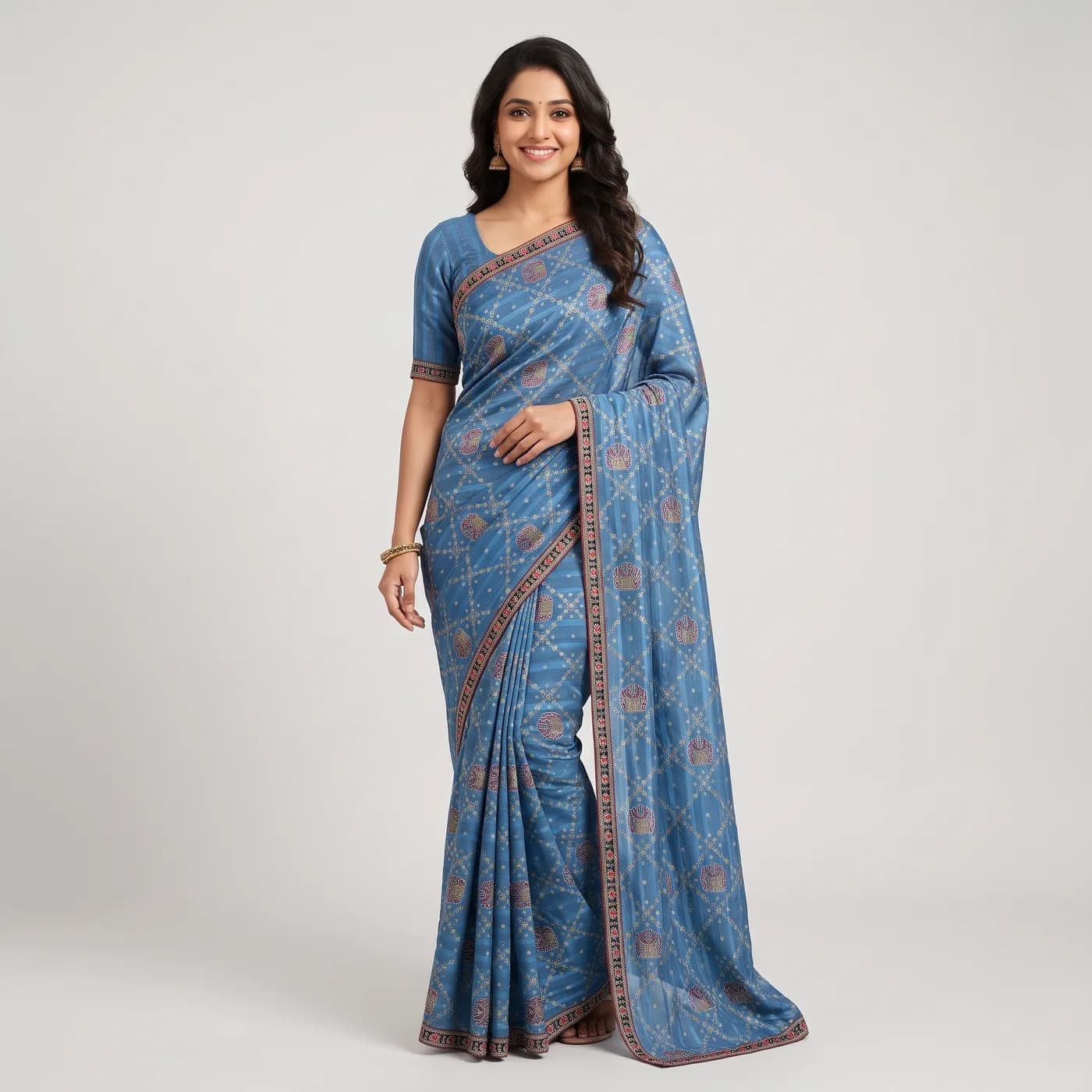
Square still has a real case. It is the shape Shopify’s own advice is written around, and if half your stock arrives with square supplier photos you cannot reshoot, square everywhere may be the practical choice.
For a catalogue that is mainly full-length sarees and lehengas, our advice is portrait 3:4. It gives the drape room, and it is the shape Myntra asks for, so your store and your marketplace listings share one look. Whatever you pick, check how your theme displays it, because the grid options depend on the theme you use.
Which shape for which garment
Collections are where the shape rule bites, so decide per collection. Here is how we would set up the common ethnic-wear ones:
| Collection | Main image | Why |
|---|---|---|
| Sarees | Portrait 3:4, full length | The border at the hem and the fall of the pallu are what is being sold. Both need height. |
| Lehengas | Portrait 3:4, full length | The flare of the skirt is the product. A square either crops it or shrinks it. |
| Salwar suits | Portrait 3:4 | Kameez length and the salwar or palazzo cut both need to be visible in one frame. |
| Kurtis | Square or portrait | A kurti is shorter, so a square framed from the knee up still shows the whole garment. Pick one and keep it. |
| Blouses and dupattas | Square | Close crops of a neckline or a dupatta border fill a square well. |
If one product lives in two collections, say a kurti set that also appears under festive wear, the stricter collection decides. A portrait photo in a square-card collection gets cropped; a square photo in a portrait collection gets a band of background above and below.
The pixel sizes SareeViz makes, against Shopify’s limits
If you make your product photos with SareeViz, the size is set under AI Instructions by two controls: Aspect Ratio for the shape and Resolution for the sharpness. The Aspect Ratio list shows the exact pixel size next to each shape for the resolution you have picked.
Square at 2K comes out at exactly 2048 x 2048 px, which is Shopify’s recommended size to the pixel. Portrait 3:4 at 2K is 1792 x 2400 px. Here is every size for the shapes a store is likely to use:
| Shape | 1K₹10 an image | 2K₹15 an image | 4K₹20 an image | 8K₹25 an image |
|---|---|---|---|---|
| 1:1 Square | 1024 x 10241.0 MP | 2048 x 20484.2 MP | 4096 x 409616.8 MP | 8192 x 819267.1 MP, too big |
| 3:4 Portrait | 896 x 12001.1 MP | 1792 x 24004.3 MP | 3584 x 480017.2 MP | 7168 x 960068.8 MP, too big |
| 4:5 Instagram portrait | 928 x 11521.1 MP | 1856 x 23044.3 MP | 3712 x 460817.1 MP | 7424 x 921668.4 MP, too big |
| 2:3 Tall portrait | 848 x 12641.1 MP | 1696 x 25284.3 MP | 3392 x 505617.1 MP | 6784 x 1011268.6 MP, too big |
Prices are per image before 18% GST, at the rate of the smallest credit pack. “Too big” means over 20 megapixels, the lower of Shopify’s two ceilings.
The table settles most of the decision. 2K is the natural Shopify size: it hits the recommendation for square and gives portrait the same quality. 4K fits in every shape, for stores whose buyers zoom into the weave. 8K is for print and is too big for any Shopify upload.
1K is smaller than Shopify recommends, which matters for one setting in particular. The Optimise for Ecommerce Upload tick locks the output at 1K, portrait 3:4 and JPEG, which is 896 x 1200 px. That suits Meesho and WhatsApp. For your own store, leave it unticked and pick 2K yourself.
Selling on marketplaces too? The presets in our marketplace image guide make each marketplace’s own size, and Myntra’s 1080 x 1440 and Amazon’s 1500 x 2000 are both smaller than Shopify recommends. Make the Shopify set at 2K rather than reusing those files.
File size, format and the DPI myth
Shopify’s file limit is 20 MB, and you only meet it with very large images. A 2K JPEG is nowhere near it. The danger zone is 4K, where a JPEG saved at maximum quality measured 14 to 15 MB on our own saree outputs. We have not measured a 4K PNG, but PNG compresses a photo less than JPEG does, so expect it to be bigger.
SareeViz’s Advanced settings tick, under Resolution, adds a Max file size. At 4K it offers 5 MB or 3 MB, either of which keeps a file well under Shopify’s limit. You do not need it at 2K for Shopify.
On format, Shopify calls PNG the best type for most product images and JPEG the runner-up. For photos of fabric on a model, the difference is invisible at catalogue size, and JPEG files are smaller. Shopify also makes the smaller copies your theme shows, so the size of the file you upload does not decide how fast a buyer’s page loads.
The same Advanced settings offer a DPI of 72, 150 or 300. Ignore it for Shopify. DPI is a label inside the file that printers read; a screen shows pixels, and a 2048 x 2048 image looks identical on your store at any DPI.
Fixing the photos you already have
Most stores do not start from scratch. They have a mix of supplier photos, phone shots and old catalogue images in every shape, and the job is to bring the main images into line.
- Right shape, wrong size. Resize to 2048 x 2048 for square or 1792 x 2400 for portrait.
- Wrong shape, plenty of space around the garment. Crop to the collection’s ratio, keeping the whole garment in frame.
- Wrong shape, garment fills the frame. Cropping will cut the product. Pad the image with background instead, or make a new photo.
- Too small. Enlarging a 600 px supplier photo to 2048 px does not add detail; it adds blur. A small photo is a reason to reshoot, not to resize.
For a photo that only needs a new pixel size, our free image resizer does it in the browser.
Alt text that a saree buyer can use
Alt text is the short description Shopify stores with each image. Screen readers read it aloud to buyers who cannot see the photo, and Shopify’s SEO guidance says search engines use it too, since they cannot look at the picture themselves.
Shopify allows 512 characters and recommends 125 or fewer. Its advice is to describe what is shown in a readable phrase and to use keywords from the page the image sits on. For ethnic wear, that means garment, colour, fabric or weave, and the view:
Weak: “saree”, or the file name IMG_2041
Stuffed: “saree silk saree buy saree online best saree for wedding cheap saree”
Useful: “Bottle green Kanjivaram silk saree with gold zari border, front view on a model”
Useful, detail shot: “Close-up of the peacock motif on the pallu of a bottle green Kanjivaram saree”
To add it, open the product in your Shopify admin, click the image to open its preview, then click Add alt text and save. Doing it as you upload takes seconds per image; doing it later for a 300-product catalogue takes an afternoon.
A Shopify photo routine for an ethnic-wear store
Once the shape is decided, making a consistent set is a routine rather than a project. This is the one we would follow with SareeViz for a portrait saree collection:
- Photograph each saree flat, in daylight, cropped to the fabric. Upload the blouse piece as its own photo if it has its own design.
- Under AI Instructions, pick 3:4 Portrait and 2K, with Optimise for Ecommerce Upload left unticked. The list shows 1792 x 2400 next to the shape.
- Set Output Format to JPEG unless you have a reason to keep PNG.
- Reuse one Model Image and one background across the collection, so the grid looks like one shoot rather than forty.
- Make the main image a front view, then add a back view or a pallu close-up as gallery images.
- Name and describe on upload: a file name with the product code, and alt text written as above.
At 2K each image is ₹15 before 18% GST, with no subscription; every pack is on the pricing page. At 4K, for buyers who zoom into the weave, it is ₹20 and the portrait file is 3584 x 4800 px, still inside Shopify’s limits.
The drape itself, including how the pallu and pleats are placed from your flat photo, is covered on our AI saree photography page.
If your store also sells Western wear or accessories, the same rules hold with an easier garment. Our ecommerce product photography page covers dresses, tops and the rest of the catalogue.
Frequently asked questions
What is the best image size for Shopify products?
Shopify's own help centre says that for square product images, 2048 x 2048 px usually displays best. For a full-length saree or lehenga, a portrait image of the same quality, such as 1792 x 2400 px at 3:4, often shows the garment better. Whichever you choose, use the same shape for the main image of every product in a collection.
What is the maximum image size Shopify accepts?
Shopify's pages give two ceilings. The product media page allows up to 5000 x 5000 px or 25 megapixels, while the theme images page says an upload can't exceed 20 megapixels or 20 MB. Staying under 20 megapixels and 20 MB satisfies both.
Should Shopify product images be square or portrait?
Either works, as long as every main image in a collection uses the same shape, because mixed shapes make the collection grid misalign. Square suits folded or flat-lay shots and close-ups. Full-length ethnic wear, where the drape and the hem are part of what is being sold, usually reads better in portrait 3:4.
Should I upload PNG or JPEG to Shopify?
Shopify says PNG is the best file type for most product images, followed by JPEG. In practice the limit to watch is the 20 MB file size, which a large PNG gets closer to than a JPEG of the same picture. Shopify creates smaller copies for your theme automatically, so buyers do not download your original file.
Does DPI matter for Shopify images?
No. DPI is a tag stored in the file that printers read. A screen shows pixels, so a 2048 x 2048 image looks the same on your store whether it is tagged 72 or 300 DPI. Change the pixel size if the image looks small or soft, not the DPI.
How long should alt text be on Shopify?
Shopify allows up to 512 characters and recommends 125 or fewer. Describe what is in the photo in a readable phrase: the garment, its colour, the fabric or weave, and the view, for example "Bottle green Kanjivaram silk saree with gold zari border, front view on a model".
Sources
Shopify Help Center pages read 29 October 2026.
- Shopify Help Center: product media types: 2048 x 2048 px for square images, up to 5000 x 5000 px or 25 MP, under 20 MB, PNG then JPEG, a consistent aspect ratio for main images
- Shopify Help Center: theme images: uploads can't exceed 20 megapixels or 20 MB
- Shopify Help Center: theme troubleshooting: inconsistent aspect ratios make product grids misalign on mobile
- Shopify Help Center: adding alt text to product media: up to 512 characters, 125 or fewer recommended
- Shopify Help Center: adding keywords for SEO: use keywords from the page in alt text
For your Shopify store
Product photos at Shopify’s size, from one flat photo
Square 2048 x 2048 or portrait 1792 x 2400, on a model, in about a minute. ₹15 an image at 2K, no subscription.
Try SareeViz free