Tri3D Alternatives 2026: Price, Reviews and 6 Saree Draping Tools
Tri3D was putting flat sarees on models back in 2020, when press reports counted more than 150 active customers. Six years on, one basic question still has no answer on its website: what does it cost? Here is what we could find, and what to compare it with.
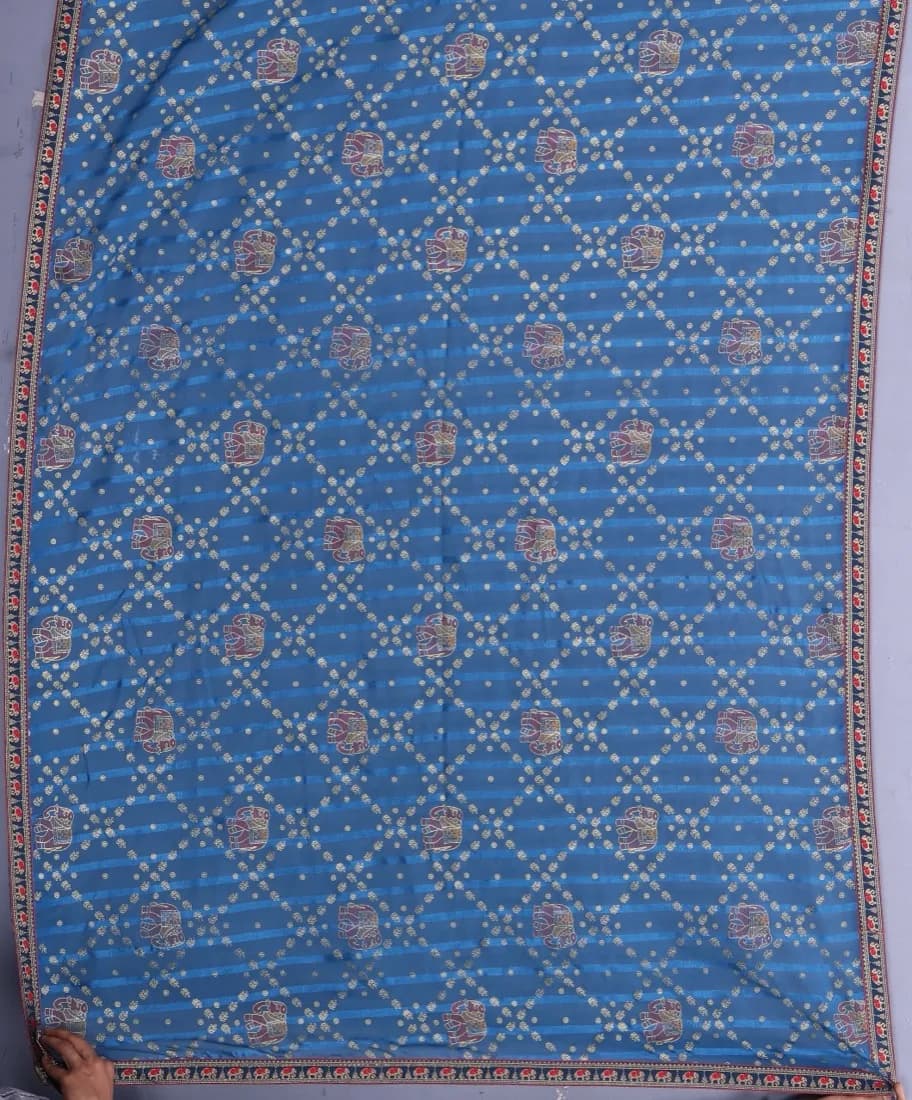
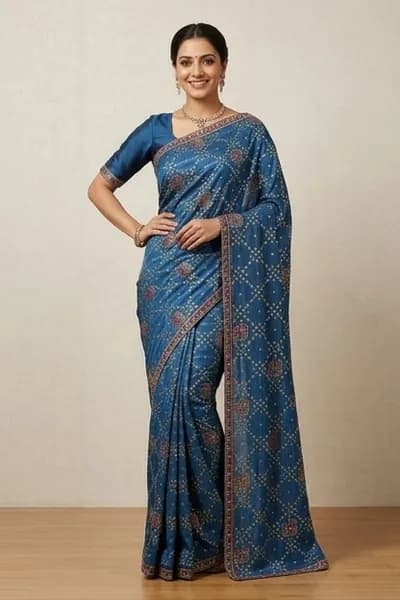
The job every tool here is doing: a flat saree goes in, a draped saree comes out. This pair was made on SareeViz.
What Tri3D does
Tri3D calls itself digital draping software for apparel and home decor businesses. Its working tool is Fab3D, which runs in a web browser. The steps on its site are simple:
- Upload a flat image of your fabric.
- Pick a template and a background from the library.
- Export the result for your website, social media or campaigns.
The site advertises 200+ fabric templates and 50+ home decor templates, bulk processing of many samples at once, and an API that connects to e-commerce platforms. The tool also has an Add QR button and colour correction.
The library is wide. Beyond sarees it has lehengas, kurtis, anarkalis, sherwanis, suits, shirts, kidswear, innerwear and home textiles such as bedding. If you sell fabric by the metre, that range is useful, because a buyer can see one fabric made up as several garments.
What happened when we tried it
On 1 November 2026 we uploaded one flat saree photo to Fab3D, without an account. Here is what we saw:
- You crop the fabric and enter its real length, so the pattern comes out at a sensible size.
- The screen says “Repeat mode: Tile”, and the fabric is repeated across the garment like a tile.
- It went onto a men's shirt and then a kurti on the same model photos within seconds.
- Every image carried a large Tri3D watermark.
- The default crop cut off our saree's border, so the result looked like a printed fabric, not a saree.
That last point is the one saree sellers should ask about. Without an account, the Saree category showed a single blouse template, and adding it to the viewer asked for a login. The sets page said new sets are coming soon.
So we could not test a draped saree. Paying customers may well see more, and a 2020 report describes Tri3D draping sarees onto models. Ask for a live demo using your own saree, including the border and pallu.
Templates or generated images: the real difference
Before you compare prices, it helps to know that these tools work in two different ways.
A template tool, like Tri3D in our test, starts from a finished model photo and maps your fabric onto it. A generative tool, like SareeViz, DrapeIt or AI Vastra, creates a new image from your photo each time.
| What you get | Template tool | Generative tool |
|---|---|---|
| Consistency | The same model and pose every time, so a catalogue looks uniform | Can vary between images, so you check each one |
| Variety | Limited to the poses and models in the library | New poses, models and backgrounds on request |
| Fabric accuracy | Your real fabric image is used, but as a repeat, so a border or pallu may not sit where it should | Generated from your image, so check borders and motifs |
| Best fit | Fabric makers showing one material in many garments | Sellers who want fresh, varied listing photos |
Neither way is simply better. For plain repeating fabric, a template is quick and keeps your real pattern. A saree is harder, because the border, pallu and pleats each have to land in a particular place. That is why a test on your own saree tells you more than any gallery.
Tri3D price: what we could find
As of 1 November 2026, we found no price on tri3d.in, and no plans or rates inside the Fab3D tool. The address tri3d.in/pricing returned a page-not-found error. The two claims it does make on price are “no usage fees” and “full image rights included”.
No usage fees suggests you are not charged per image, but the site does not say what you do pay. When you ask for a quote, get these answers in writing:
- Is it a one-time, yearly or monthly fee?
- Is there a limit on images or templates at that price?
- What size are the exported images?
- Is GST included?
A flat fee can work out well for a very large catalogue. To compare it fairly, divide the quote by the images you make in a year. Our product photography cost guide has a calculator for the studio side of that sum.
Tri3D reviews: what we could find
We looked for independent reviews and found none worth relying on. What exists is press coverage from late 2020:
- More than 150 active customers, including retailers, wholesalers, manufacturers and handloom weavers.
- 80,000 garments digitised in one year, sold in India, Sri Lanka and Abu Dhabi.
- Customers quoted as saying it cut their photography cost and saved time.
Those are real signals of use, but they are six years old and the quotes were not gathered independently. Before you buy, ask Tri3D for two current customers who sell what you sell. Our own test above used one saree without an account, so it does not tell you what a paying customer's saree images look like.
When Tri3D is still the right choice
- You sell fabric and want one material shown as many garments.
- You want every image in the same model and pose.
- You also sell home textiles such as bedsheets and pillows.
- You want an API that connects to your own website.
- You make enough images that a flat fee beats paying per image.
If none of those sound like you, and you mainly want listing photos for Meesho, Amazon, Myntra or Flipkart, the tools below are easier to price.
6 Tri3D alternatives for saree sellers
SareeViz
Best for: Sarees and Indian ethnic wear, priced per image
Our own tool, so weigh this entry accordingly. You upload a phone photo of the saree and its blouse piece, and SareeViz generates the whole outfit on an AI model.
Presets set the poses, background and size for Myntra, Amazon, Flipkart and Meesho. It also covers lehengas, kurtis, salwar suits, menswear, dresses, innerwear and jewellery.
Pricing: Pay per image with no subscription: ₹10 at 1K, ₹15 at 2K, ₹20 at 4K and ₹25 at 8K, plus 18% GST. 5 free credits on signup. Credits expire 90 days after purchase.
Good at
- Saree and blouse uploaded separately, worn as one outfit
- Presets for the four big marketplaces
- Prices published for every size, up to 8K
- Photos and videos from the same credits
Worth knowing
- No setting to pick a regional drape; the drape follows the pose
- Each image is generated, so check borders and pallu before you list
- Credits expire 90 days after purchase
DrapeIt (Drape.Studio)
Best for: Low-cost 1K and 2K images, with a WhatsApp workflow
Pricing: ₹540 for 40 images at 1K or 27 at 2K, up to ₹3,000 for 270 or 180. That is about ₹11 to ₹14 at 1K and ₹17 to ₹20 at 2K, before 18% GST.
Good at
- Prepaid packs, nothing recurring
- WhatsApp access for phone-first sellers
Worth knowing
- 2K is the ceiling, with no 4K or 8K
AI Vastra
Best for: Sellers who only need 2K
Pricing: ₹12.50 a photo on the ₹1,000 pack, falling to ₹10 on the ₹10,000 pack, before 18% GST.
Good at
- Low 2K rates, stated on each pack
Worth knowing
- One output size, so no 1K, 4K or 8K
ChitromAI
Best for: Several frames from one saree photo, plus short reels
Pricing: Credit packs from ₹299 to ₹5,699 at regular prices. An image costs ₹14 to ₹106 at 1K and ₹35 to ₹269 at 4K, depending on the pack, before 18% GST.
Good at
- Eight frames per clothing generation
- Ethnic wear is a named category, up to 4K
Worth knowing
- The small packs are expensive per image
- Files auto-delete after 10 to 20 hours, so download promptly
SareeDrape.in
Best for: A saree-only tool you can start free
Pricing: A free start, with no prices published when we read its site on 29 September 2026.
Good at
- Built for sarees only
- You mark each part, so the tool knows which is which
Worth knowing
- No lehenga or jewellery mentioned
- Output size and batch limits not stated
Mahashankh Saree Designer
Best for: Manufacturers who want to design and drape in one place
Pricing: ₹399 to ₹699 a design depending on the account type, GST included, as read on 29 September 2026.
Good at
- Design and draping in one workflow
Worth knowing
- Priced per design, not per photo
- Not aimed at catalogue listing images
Prices side by side
This is our standing comparison of Indian AI photo tools, per image and before GST. Tri3D is not in it because it publishes no price.
Smallest plan
| Tool | How you pay | Starting at | 1K | 2K | 4K | 8K | GST |
|---|---|---|---|---|---|---|---|
| SareeViz | Pay per image, no plans | ₹100 | ₹10 | ₹15 | ₹20 | ₹25 | +18% GST |
| DrapeIt | Prepaid packs | ₹540 | ₹14 | ₹20 | Not offered | Not offered | +18% GST |
| AI Vastra | Prepaid packs | ₹1,000 | Not offered | ₹12.50 | Not offered | Not offered | +18% GST |
| Glamolic | One-time credit packs | ₹999 | Not offered | ₹50 | ₹75 | Not offered | +18% GST |
| Ayna | Subscription, monthly or yearly (yearly shown) | ₹913/mo | Not offered | ₹46 | Not offered | Not offered | +18% GST |
| Scalio | Monthly subscription | ₹999/mo | ₹17 | ₹33 | ₹33 | Not offered | +18% GST |
| ChitromAI | Credit packs | ₹299 | ₹106 | ₹172 | ₹269 | Not offered | +18% GST |
Biggest plan
| Tool | Starting at | 1K | 2K | 4K | 8K | GST |
|---|---|---|---|---|---|---|
| SareeViz | ₹20,000 | ₹9.64 | ₹14.46 | ₹19.28 | ₹24.10 | +18% GST |
| DrapeIt | ₹3,000 | ₹11 | ₹17 | Not offered | Not offered | +18% GST |
| AI Vastra | ₹10,000 | Not offered | ₹10 | Not offered | Not offered | +18% GST |
| Glamolic | ₹99,999 | Not offered | ₹31 | ₹46 | Not offered | +18% GST |
| Ayna | ₹18,675/mo | Not offered | ₹125 | ₹187 | Not offered | +18% GST |
| Scalio | ₹1,999/mo | ₹10 | ₹20 | ₹20 | Not offered | +18% GST |
| ChitromAI | ₹5,699 | ₹14 | ₹24 | ₹35 | Not offered | +18% GST |
Competitor prices from each tool's own pricing page. They change, so check before you buy.
How to test before you pay
Pick your hardest saree, ideally one with a heavy border and a detailed pallu. Run that same saree through two or three tools, then check these points:
- Does the border stay the same all the way round?
- Does the pallu show your real design, or something close to it?
- Does the colour match the saree in your hand?
- Does the blouse match your blouse piece?
- Would a buyer who receives this saree feel it matches the photo?
That last point matters most, because a photo that looks better than the saree can come back as a return. Our photo prep guide shows how to shoot the input so every tool gets a fair test.
For the wider field, including tools for try-on and social content, see our saree draping software comparison.
Frequently asked questions
What is the price of Tri3D saree draping software?
We could not find a published price on tri3d.in or in its Fab3D tool as of 1 November 2026. The home page says "no usage fees" and "full image rights included", but it does not say what you pay to get access. Ask Tri3D for a written quote, and ask whether it is a one-time, yearly or monthly fee.
What is the best Tri3D alternative for sarees?
It depends on what you want to see before you pay. For sarees with a separate blouse piece, marketplace presets and sizes up to 8K, we built SareeViz for that job. For 2K only, compare AI Vastra and DrapeIt. For a saree-only tool you mark up yourself, look at SareeDrape.in.
Is there a free Tri3D alternative?
Most of these tools offer a small free start rather than being free for good. SareeViz gives 5 free credits on signup, and SareeDrape.in says you can start free. Use the free images on one of your own sarees, because a sample gallery only shows a tool's best work.
Can I try Tri3D for free?
You can open Fab3D and apply your own fabric without an account, as we did on 1 November 2026, but every image carries a large Tri3D watermark. Adding templates from the library asks for a login, and the login box we saw had no sign-up option, so you will need to contact Tri3D for an account.
Can I download Tri3D software for free?
Fab3D opens in a web browser at fabric.tri3d.in, and we did not see a desktop download on Tri3D's pages. Be careful with "free download" or cracked copies on other websites: they are not from the company, and they are a common way to pick up malware.
Are Tri3D and Fab3D the same thing?
Tri3D is the company and Fab3D is its fabric visualiser. Press reports from 2020 describe Tri3D as a start-up incubated by IIT Madras in collaboration with NASSCOM.
Does Tri3D work for kurtis and lehengas too?
Yes. Without an account on 1 November 2026, its library showed 20 Kurti Women templates, 9 Lehenga, 4 Anarkali and 47 Suit, along with Sherwani, Shirt, Kids and Home for bedding and furnishing. The Saree category showed one blouse template.
Sources
Tri3D's pages read and Fab3D tested 1 November 2026. SareeDrape.in and Mahashankh details read 29 September 2026.
- Tri3D: home page: how it works, template counts, bulk processing, API, "no usage fees"
- Tri3D: Fab3D fabric visualiser: the browser tool we tested, and its template categories
- Apparel Resources, 30 November 2020: founders, IIT Madras incubation, active customers
- Indian Textile Magazine, 10 December 2020: garments digitised, customer quotes
- DrapeIt: pricing
- AI Vastra: pricing
- ChitromAI: pricing
- SareeDrape.in
Try It Free
Test your hardest saree with 5 free credits
Upload the saree and the blouse piece, and see the full outfit on a model before you spend anything.
Try SareeViz Free →