Flipkart Photoshoot from one phone photo
Front, side and back on one model, on the light grey background Flipkart asks for.
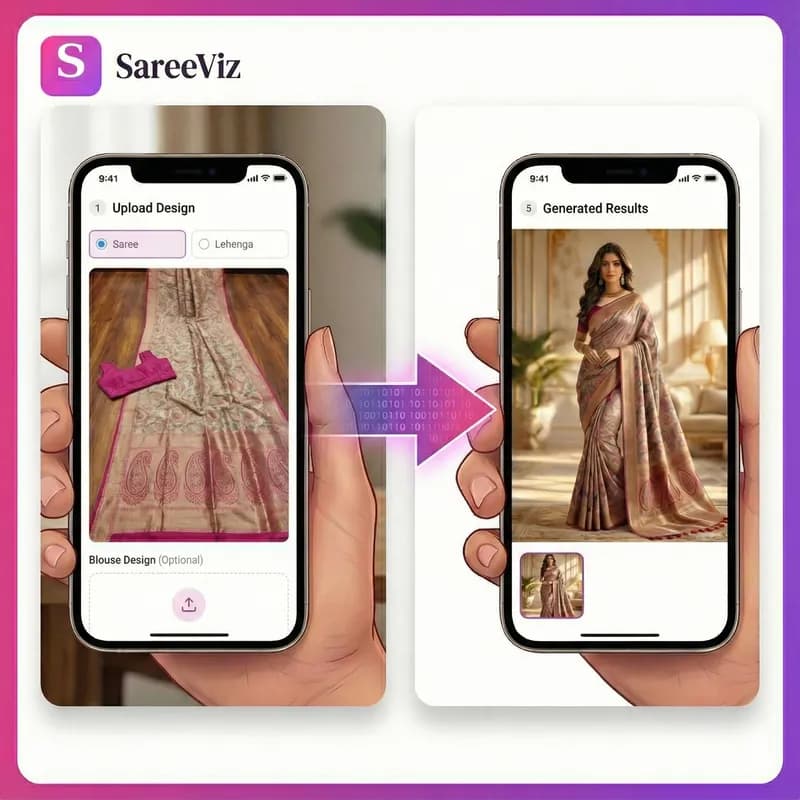
Supported apparels
- • Sarees
- • Lehengas
- • Men's Kurtas
- • Kurtis
- • Salwar suits
- • Men's Dress
- • Women's Dresses
- • Stoles/Shawls
- • Men's Innerwear
- • Women's Innerwear
- • Jewelry
Try for FREE
Flipkart is one of the few marketplaces that tells clothing sellers exactly what colour the background must be: light grey with a soft shadow, and a white background is rejected. It also wants the same model in every photo and no mannequins, which is what makes a Flipkart photoshoot hard to do at home. SareeViz turns one phone photo of your design into 3 on-model photos that follow those rules, for 4.5 credits a design.
What Flipkart asks for in clothing photos
These are Flipkart’s image rules as Fynd publishes them for sellers listing on Flipkart, read on 23 October 2026. The apparel rules sit on top of the general ones.
| Size | At least 1000 x 1000 pixels |
| File format | JPEG only |
| Background | Light grey with a soft shadow for clothing; white is not accepted |
| Views | Front and back are mandatory; a side view is optional |
| Number of photos | At least 2, 3 preferred, 5 at most |
| Model | The same model in every photo, in a well-fitted garment, with the same skin tone throughout; no mannequins |
| Garment | No creases or folds, shown without packing |
| Text, tags and props | No text, watermark, price tag, sticker or props |
| Lighting | Soft and natural, not harsh or very bright |
Two of these rules trip sellers up more than the rest. A 1K portrait photo is only 896 pixels wide, under Flipkart’s 1000 pixel minimum, so the preset makes 2K. And a phone shot on a white wall fails the background rule even when the garment looks perfect.
The Flipkart set SareeViz makes from one photo
One saree photo in, three photos out. These came straight from the Flipkart preset, with nothing retouched afterwards.
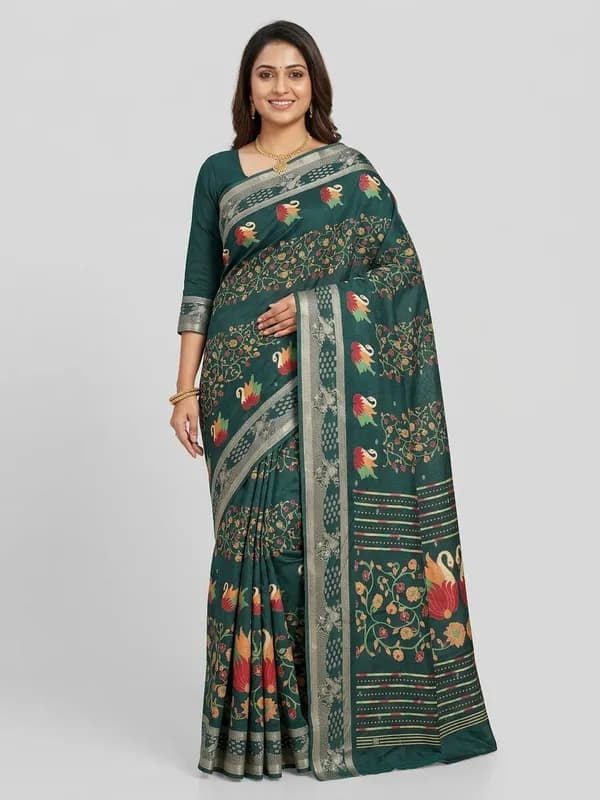
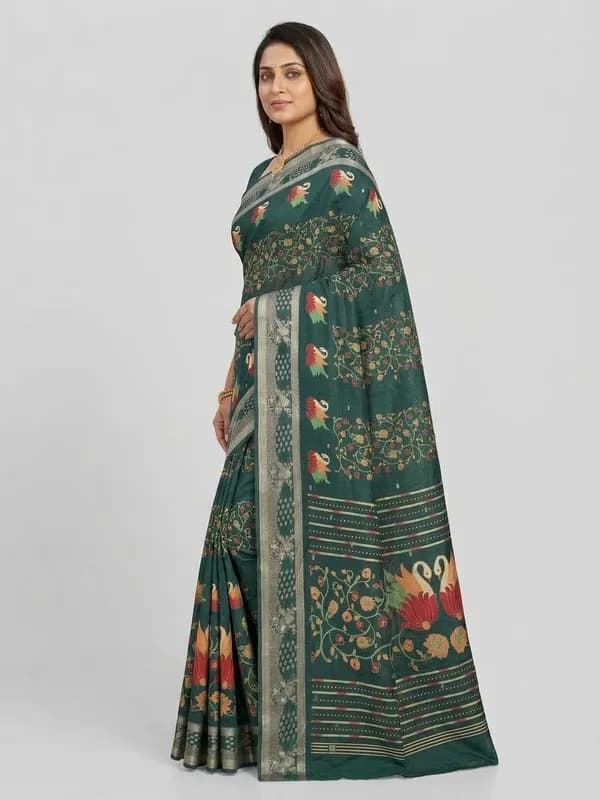
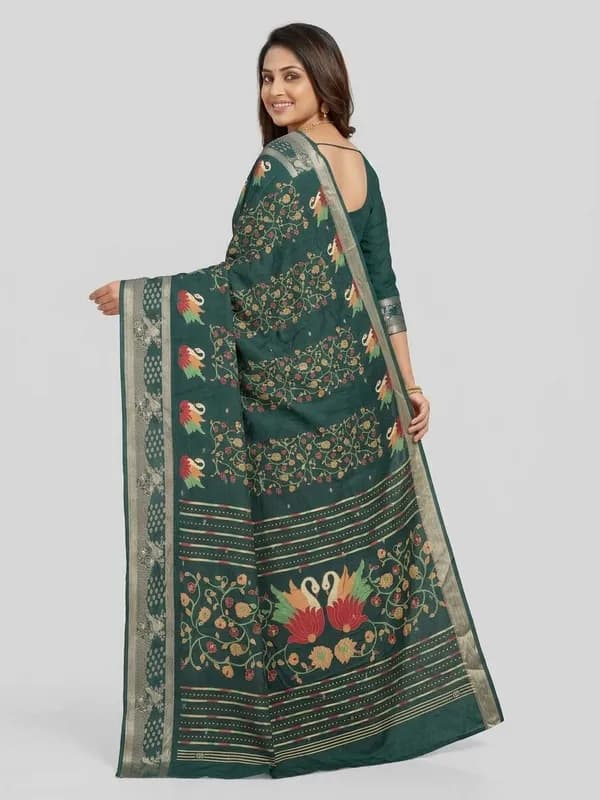
| What the Flipkart preset sets | |
|---|---|
| Poses | Front Standing, Left Profile, Back View |
| Background | Light Grey Studio |
| Model | Indian Model, or upload your own model photo |
| Output | 2K, portrait 3:4, JPEG |
| Credits per design | 4.5 |
A Flipkart photoshoot, step by step
- 1
Photograph the design on your phone
Laid flat or hanging straight, in daylight, with only the fabric in the frame. Iron it first: Flipkart rejects creases and folds. The photo prep guide has the four rules that save a wasted generation.
- 2
Upload it and pick Flipkart
Upload the photo in section 1, open Marketplace in section 2 and pick Flipkart. The poses, the light grey background, the model and the 2K JPEG output are set and locked, so every design in the catalogue matches.
- 3
Clear your branding
Flipkart allows no text or watermark, so clear the brand logo, brand name and design number in Branding Details before you generate.
- 4
Generate, check and upload
Each photo takes about a minute. Check the border, the print and the colour against the real garment, then upload the front view first, then the back and the side. If something is off, the fixing a result guide covers the usual causes.
What a Flipkart photoshoot costs
A 2K photo is 1.5 credits, so a full Flipkart set of 3 is 4.5 credits, which is ₹45 plus 18% GST per design. Credits are only taken for photos that generate successfully, and a new account starts with 5 free credits, enough for one full Flipkart set before you pay anything. There is no subscription; the pricing page lists every credit pack.
Budget for a retry or two on some designs. Across the 207,556 catalogue images in our study of how Indian sellers photograph ethnic wear, sellers kept roughly one image in three. If you are weighing this against a studio quote, our guide to product photography cost in India has real studio rate cards and a calculator for your own numbers.
Flipkart photos for sarees and ethnic wear
Flipkart’s back-view rule matters more for a saree than for almost anything else, because the back is where the pallu falls and where buyers judge it. A saree is also two garments, the drape and the blouse piece; upload both and they are worn as one outfit in all three views, with the border and pallu kept as photographed. The saree photography page shows that flow on a real design.
Selling on more than Flipkart? Each marketplace has its own page: Myntra, whose rules are close to Flipkart’s, Amazon and Meesho. The ecommerce photography page covers them together, and the catalogue photoshoot page prices a whole season of designs at once.
Questions Flipkart sellers ask
What are Flipkart's photo requirements for clothing?
Flipkart’s image guidelines ask for at least 1000 x 1000 pixels, JPEG only, and for clothing a light grey background with a soft shadow (a white background is not accepted). Front and back views are mandatory and a side view is optional. The same model must be used in every photo, mannequins are not allowed, and there can be no text, watermark, price tag or props. Between 2 and 5 images are allowed, with 3 preferred. Our Flipkart image guide keeps the full list.
Can I use a mannequin for Flipkart clothing photos?
No. Flipkart's apparel image rules say mannequin images are not allowed, so clothing has to be shown on a model, and the same model in every photo of the product.
Does Flipkart accept AI-generated model photos?
Flipkart's image rules are about what the photo shows: the background, the views, a well-fitted garment on one model, no text or props. They do not say how the photo has to be made. What matters is that the design, colour and details match the product the buyer receives, so check each image against the real garment before you list it.
How many photos does the Flipkart preset make?
3 per design: Front Standing, Left Profile, Back View. Front and back are the views Flipkart requires, and the side view is the optional third it prefers. All 3 use the same model on a light grey studio background, as Flipkart asks.
What does a Flipkart photoshoot cost here?
The Flipkart preset makes 3 photos at 2K, and a 2K photo is 1.5 credits, so one design costs 4.5 credits. New accounts get 5 free credits, and credits are only taken for photos that generate successfully. The pricing page has the rupee rate for each credit pack.
Flipkart ke liye photo kaise banaye? (How do I make photos for Flipkart?)
Photograph each design flat on your phone in daylight, crop it so only the fabric shows, upload it to SareeViz and pick Flipkart in the Marketplace section. You get front, side and back views on one model, on a light grey background, sized above Flipkart's 1000 x 1000 minimum.
Simple, credit‑based pricing
₹100 + GST$1.15
10 credits
₹500 + GST$5.75
50 credits
₹1,000 + GST$11.50
100 credits
₹5,000 + GST$57.50
515 credits
15 bonus credits
₹10,000 + GST$115.00
1,030 credits
30 bonus credits
₹20,000 + GST$230.00
2,075 credits
75 bonus credits
Credits expire 90 days from the date of purchase. See Terms.
Every resolution, video rate and credit pack is set out in one place. See full pricing.
Guides
Learn how to get the best results
Step-by-step guides for every garment: what each upload slot controls, how to prepare your design photo, and how to fix a result that does not look right.