Myntra Photoshoot from one phone photo
Front, side, back and two more on one model, on the light grey background Myntra asks for.
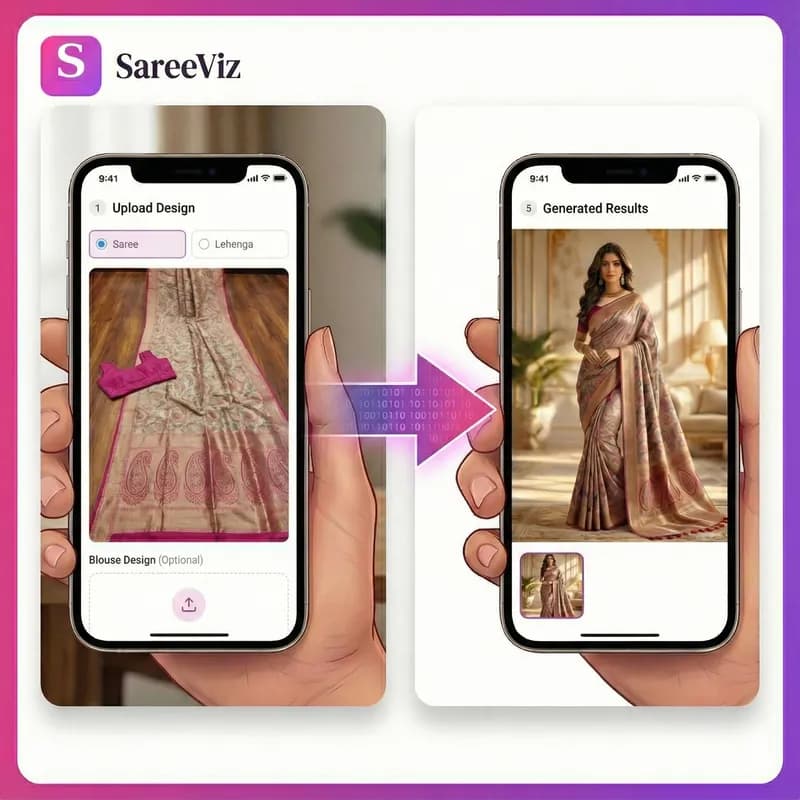
Supported apparels
- • Sarees
- • Lehengas
- • Men's Kurtas
- • Kurtis
- • Salwar suits
- • Men's Dress
- • Women's Dresses
- • Stoles/Shawls
- • Men's Innerwear
- • Women's Innerwear
- • Jewelry
Try for FREE
Myntra is the strictest of the big Indian marketplaces about clothing photos. It sets a minimum size of 1080 x 1440, a light grey background with a soft shadow, front, side and back views on a well-fitted model, and a rule that the product must not be hidden behind the model’s hands. SareeViz turns one phone photo of your design into 5 on-model photos that follow those rules, for 7.5 credits a design.
What Myntra asks for in clothing photos
These are Myntra’s image rules as Fynd publishes them for sellers listing on Myntra, read on 23 October 2026. The apparel rules sit on top of the general ones.
| Size | At least 1080 x 1440 pixels, 3:4, 72 dpi or more |
| File | JPEG only, 500 KB to 1 MB each |
| Background | Light grey with a soft shadow for clothing; white is not accepted |
| Views | Front, side and back are mandatory |
| Details | Patterns or embroidery in a separate photo, not cropped or zoomed from another |
| Number of photos | Up to 7 |
| Model | A well-fitted garment, neither loose nor very tight, with the same skin tone throughout; the product must not be covered by hands |
| Garment | Ironed, with no creases or folds |
| Text and tags | No text, watermark, price tag or sticker |
| Lighting | Soft, with natural shadows; hard light changes the colour |
The hands rule is why the preset leaves out poses like Namaste, where the hands cross the garment. And because a 1K portrait photo is 896 x 1200, under Myntra’s minimum, the preset makes 2K.
The Myntra set SareeViz makes from one photo
One saree photo in, 5 photos out, straight from the Myntra preset with nothing retouched afterwards.
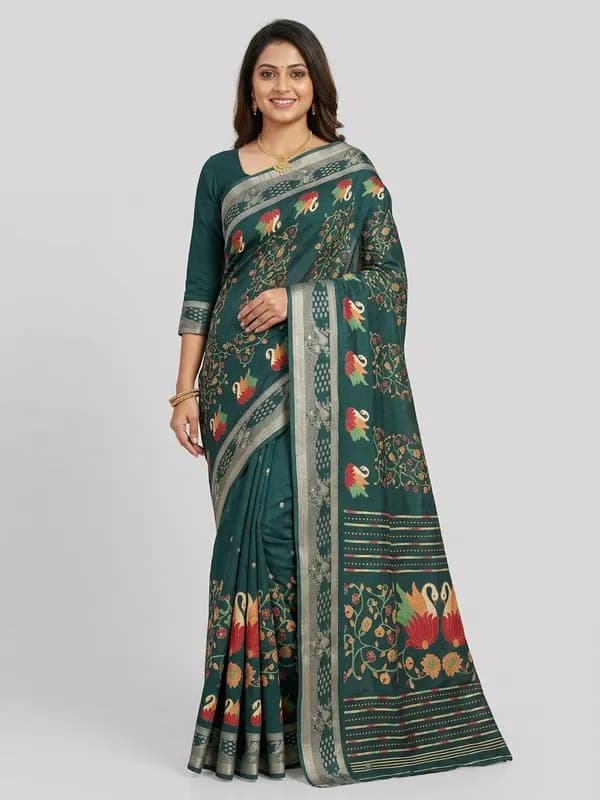
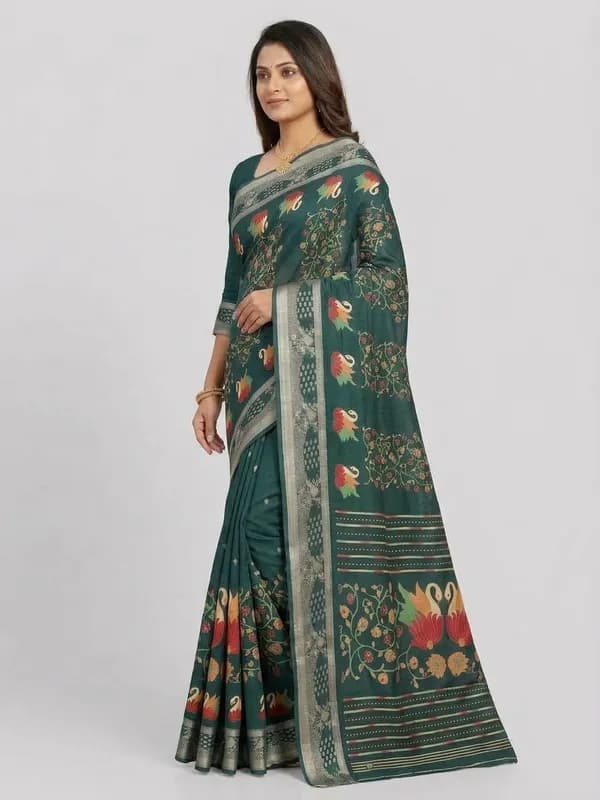
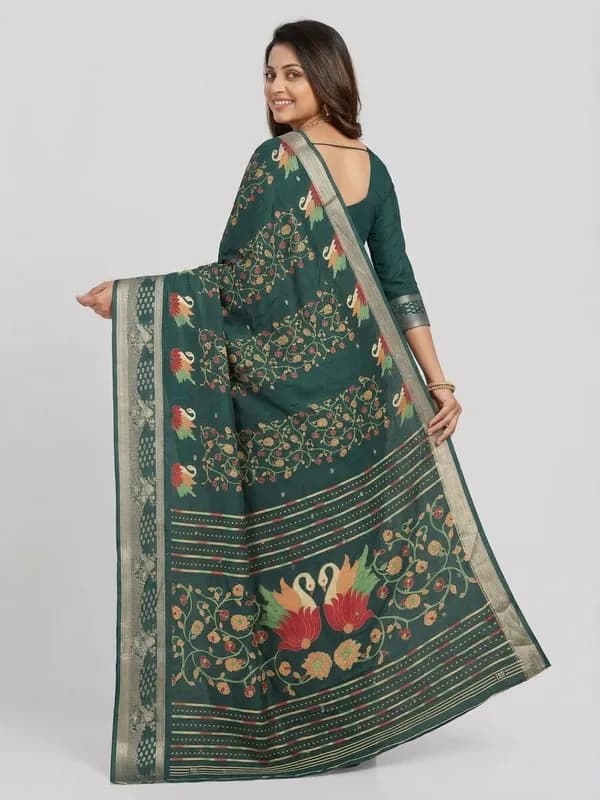
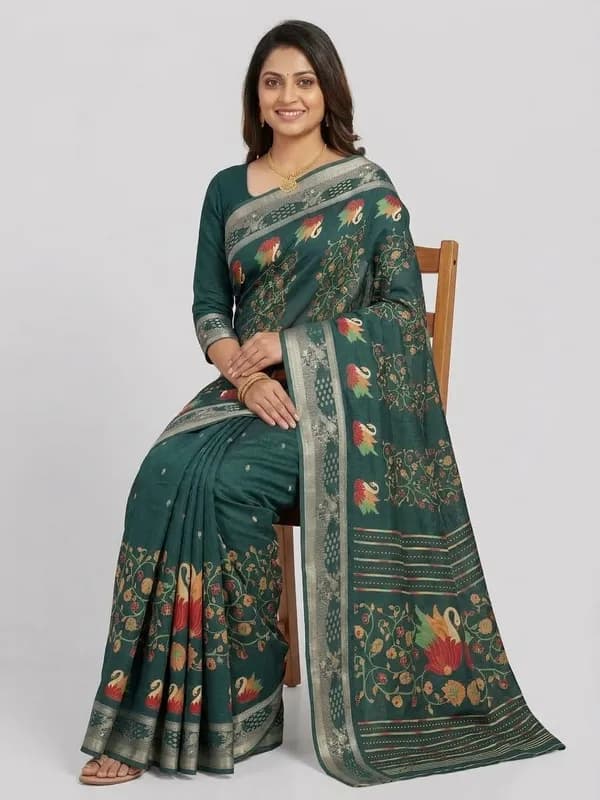
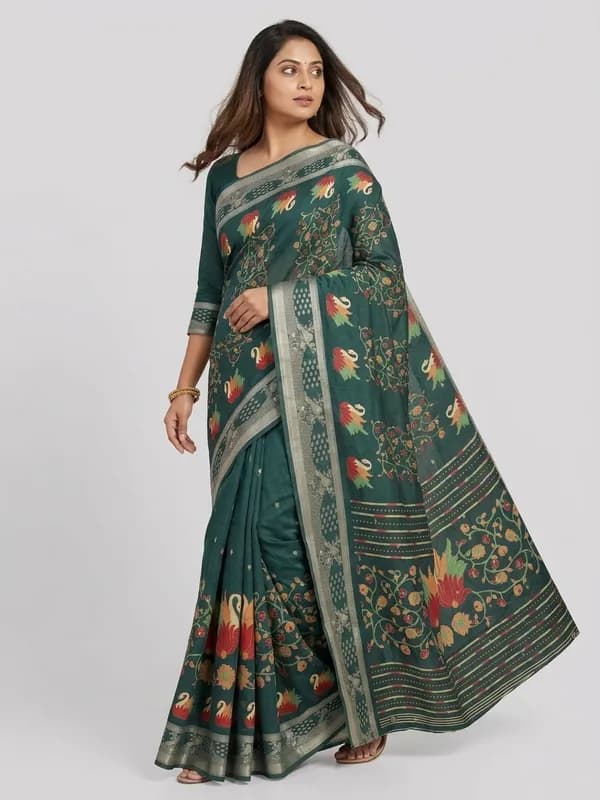
| What the Myntra preset sets | |
|---|---|
| Poses | Front Standing, Left Profile, Back View, Seated, Candid Stroll |
| Background | Light Grey Studio |
| Model | Indian Model, or upload your own model photo |
| Output | 2K, portrait 3:4, JPEG |
| Credits per design | 7.5 |
A Myntra photoshoot, step by step
- 1
Photograph the design on your phone
Laid flat or hanging straight, in daylight, with only the fabric in the frame. Iron it first: Myntra rejects creases and folds. The photo prep guide has the four rules that save a wasted generation.
- 2
Upload it and pick Myntra
Upload the photo in section 1, open Marketplace in section 2 and pick Myntra. The poses, the light grey background, the model and the 2K JPEG output are set and locked, so every design in the catalogue matches.
- 3
Clear your branding
Myntra allows no text or watermark, so clear the brand logo, brand name and design number in Branding Details before you generate.
- 4
Generate, check and upload
Check the border, the print and the colour against the real garment, compress any file over 1 MB, and add a separate close-up of embroidery if the design has it. If something is off, the fixing a result guide covers the usual causes.
What a Myntra photoshoot costs
A 2K photo is 1.5 credits, so a full Myntra set of 5 is 7.5 credits, which is ₹75 plus 18% GST per design. Credits are only taken for photos that generate successfully, and a new account starts with 5 free credits. There is no subscription; the pricing page lists every credit pack.
Budget for a retry or two on some designs. Across the 207,556 catalogue images in our study of how Indian sellers photograph ethnic wear, sellers kept roughly one image in three. If you are weighing this against a studio quote, our guide to product photography cost in India has real studio rate cards and a calculator for your own numbers.
Myntra photos for sarees and ethnic wear
Myntra’s rule that embroidery gets its own photo suits ethnic wear, where the border, the pallu or the yoke is often the reason someone buys. Make the model set with the preset, then add a close phone photo of the work itself as the detail shot. A saree is also two garments, the drape and the blouse piece; upload both and they are worn as one outfit in every view. The saree photography page shows that flow on a real design.
Selling on more than Myntra? Each marketplace has its own page: Flipkart, which also wants light grey, Amazon and Meesho. The ecommerce photography page covers them together, and the catalogue photoshoot page prices a whole season of designs at once.
Questions Myntra sellers ask
What are Myntra's photo requirements for clothing?
Myntra’s image guidelines ask for at least 1080 x 1440 pixels in a 3:4 ratio, at 72 dpi or more, JPEG only, with each file between 500 KB and 1 MB. Clothing needs a light grey background with a soft shadow (white is not accepted), and front, side and back views are mandatory. Patterns or embroidery need their own photo rather than a crop of another, the product must not be covered by hands, and no text, watermark or price tag is allowed. Up to 7 images can be uploaded. Our Myntra image guide keeps the full list.
What image size does Myntra need?
At least 1080 x 1440 pixels, portrait 3:4, at 72 dpi or more. The Myntra preset makes 2K portrait 3:4, which is above that minimum. Myntra also wants each file between 500 KB and 1 MB, so if a downloaded photo is over 1 MB, compress it before you upload.
Does Myntra accept AI-generated model photos?
Myntra's image rules are about what the photo shows: the background, the views, a well-fitted garment, nothing covered by hands, no text. They do not say how the photo has to be made. What matters is that the design, colour and details match the product the buyer receives, so check each image against the real garment before you list it.
How many photos does the Myntra preset make?
5 per design: Front Standing, Left Profile, Back View, Seated, Candid Stroll. Front, side and back are the views Myntra requires; the seated and walking shots show how the garment sits and moves. All use the same model on a light grey studio background. Add a close-up of any embroidery as its own photo, as Myntra asks.
What does a Myntra photoshoot cost here?
The Myntra preset makes 5 photos at 2K, and a 2K photo is 1.5 credits, so one design costs 7.5 credits. New accounts get 5 free credits, and credits are only taken for photos that generate successfully. The pricing page has the rupee rate for each credit pack.
Myntra pe photo reject kyun hoti hai? (Why does Myntra reject photos?)
The common reasons in Myntra's rules: an image under 1080 x 1440 pixels, a white instead of light grey background, a missing side or back view, embroidery shown only as a crop of another photo, hands covering the product, creases in the garment, or text and watermarks on the photo.
Simple, credit‑based pricing
₹100 + GST$1.15
10 credits
₹500 + GST$5.75
50 credits
₹1,000 + GST$11.50
100 credits
₹5,000 + GST$57.50
515 credits
15 bonus credits
₹10,000 + GST$115.00
1,030 credits
30 bonus credits
₹20,000 + GST$230.00
2,075 credits
75 bonus credits
Credits expire 90 days from the date of purchase. See Terms.
Every resolution, video rate and credit pack is set out in one place. See full pricing.
Guides
Learn how to get the best results
Step-by-step guides for every garment: what each upload slot controls, how to prepare your design photo, and how to fix a result that does not look right.